PdfCraft: ArtCraft's Open-Source Acrobat Alternative
Unofficial guide · Updated Oct 11, 2026 · 8 min read
TL;DR
PdfCraft is ArtCraft’s free, open-source Acrobat alternative. As of Oct 11, 2026 it is alpha: strong on page work, forms and comments, weak on editing existing text.
- PdfCraft v0.6.0 ships for Windows, macOS, Linux, FreeBSD and the browser.
- The project rates itself at about 94% of must-have Acrobat features and 55% of everyday use.
- Code is MIT or Apache-2.0; the ArtCraft name and logo are not covered.
As of Oct 11, 2026
Question: Price
Short answer: Free and open source
Source: getartcraft.com/apps
Question: Status
Short answer: Alpha
Source: PdfCraft README
Question: Latest release
Short answer: v0.6.0 (Oct 11, 2026)
Source: GitHub Releases
Question: Runs in a browser
Short answer: Yes, as a static web build
Source: PdfCraft README
Question: Edits existing text well
Short answer: Not yet
Source: PdfCraft README
The catch: the coverage numbers are the project’s own estimate, and nobody has published a side-by-side quality test against Acrobat yet.
https://getartcraft.com/apps/pdfcraft
Verdict: Try PdfCraft for merging, splitting, forms, comments and redaction; keep another editor for heavy text edits and Office export.
PdfCraft is the PDF app in the ArtCraft suite, released as a free Acrobat alternative written in Rust. Its GitHub description calls it a clean-room reimplementation of Adobe Acrobat. Searches for PdfCraft jumped on Oct 8, 2026, the day the ArtCraft apps hit the news, and the project shipped three releases in four days. This unofficial PdfCraft guide explains what the app does today, how the project scores itself against Acrobat, where to download PdfCraft safely, and which other products share the PDFCraft name. PSDraw is not affiliated with the ArtCraft team.
What is PdfCraft?
PdfCraft is a desktop PDF workbench from the team behind ArtCraft. The getartcraft.com apps page lists PdfCraft next to PhotoCraft, VectorCraft, LightCraft, FilmCraft, EffectCraft and DesignCraft, with the label “early alpha” and badges for Mac, Windows, Linux and Web. The PdfCraft README says plainly that PdfCraft is alpha and moving fast.
The PdfCraft repository describes three parts: an engine, a command-line tool, and the app itself. There is also an opt-in MCP server, so an AI agent can drive PdfCraft without the window. The README promises no account, no telemetry and no cloud processing, so your PDF stays on your machine. That matters if you handle contracts or medical forms.
PdfCraft is written in pure Rust, like the rest of the PdfCraft ArtCraft family. The README says it is independent and not affiliated with, sponsored by or endorsed by Adobe Inc. If you came here from the ArtCraft vs Adobe overview, PdfCraft is the app that maps to Acrobat. If you came from the news, the Adobe clone story covers how the whole suite was built.
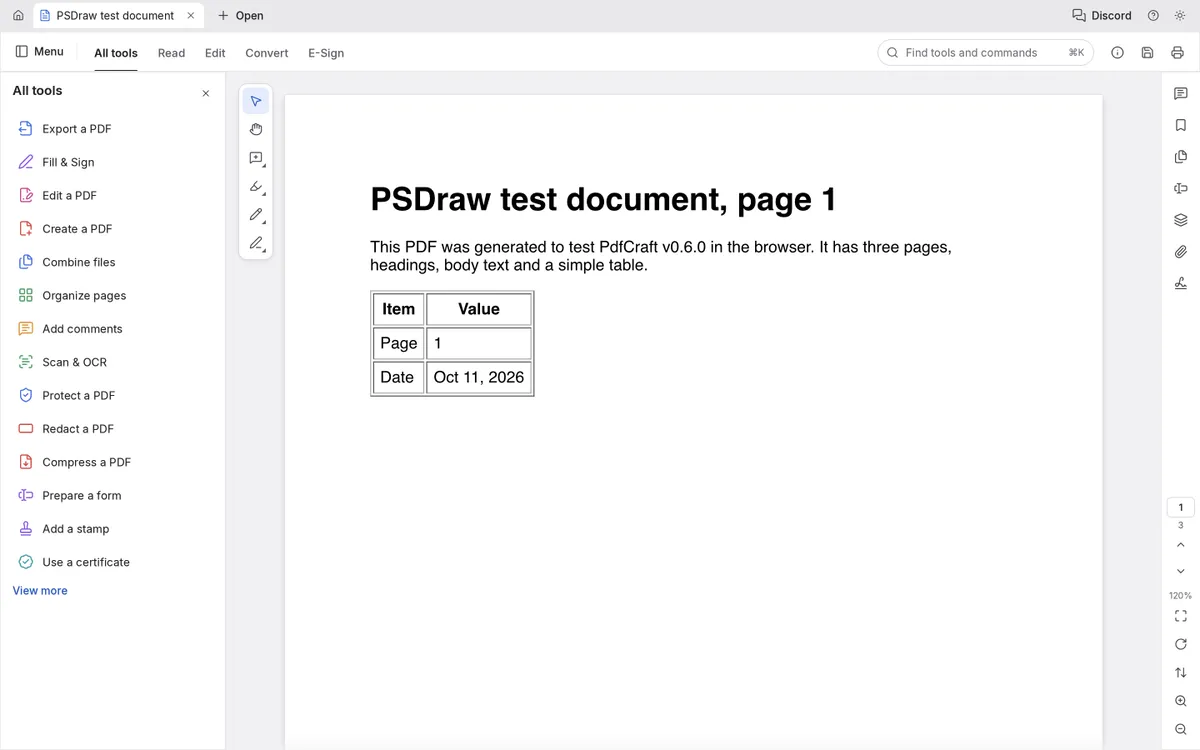
Tested by the PSDraw team on Oct 11, 2026 with the official PdfCraft v0.6.0 web build (checksum verified).
PdfCraft vs Acrobat
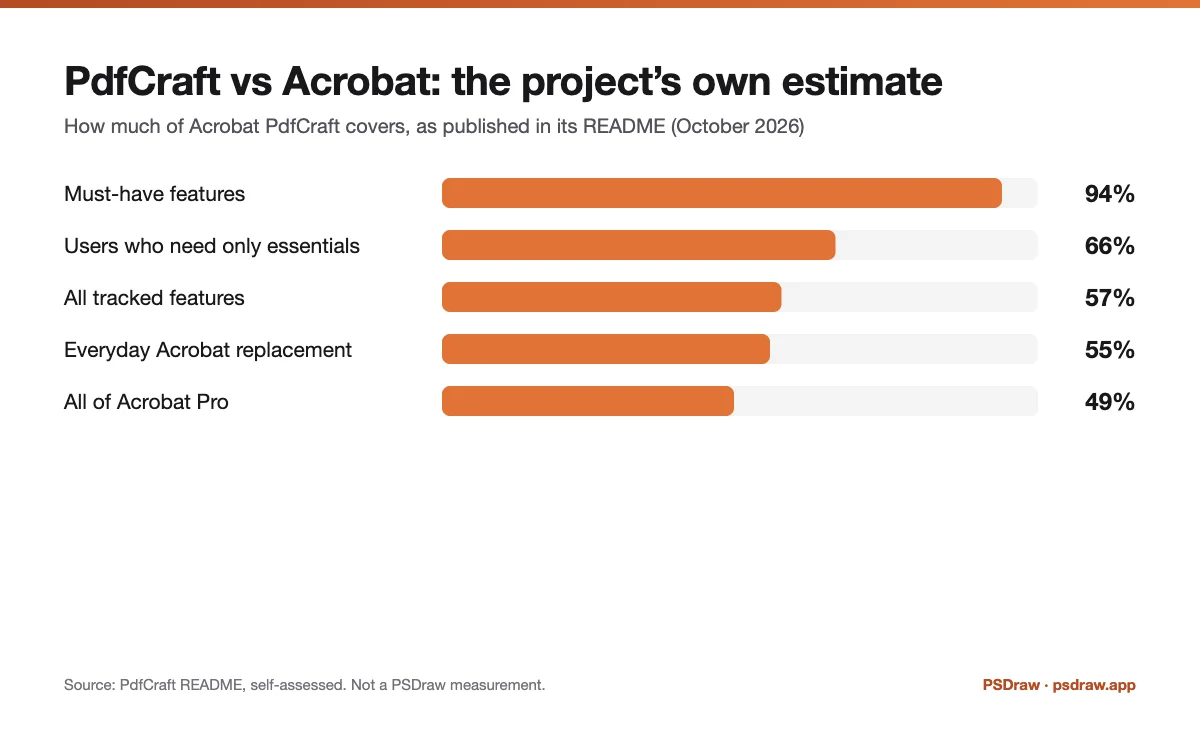
PdfCraft vs Acrobat is the question most people ask first. The PdfCraft README answers it with its own scorecard, dated October 2026. PdfCraft covers about 94% of the features the project marks as must-have, and about 57% of every feature it tracks. As an everyday Adobe Acrobat alternative, PdfCraft rates itself at about 55%. Against all of Acrobat Pro the figure is about 49%, and for people who only need the essentials it is about 66%.
Read those numbers as a map, not a verdict. They are the project’s own estimate, and the README admits that quality has not been compared with Acrobat side by side. The table below turns the same claims into simple marks, so you can see where PdfCraft is already usable and where it still trails.
Must-have features present (~94%)
PdfCraft: Partial
Acrobat: ✓
All tracked features (~57%)
PdfCraft: Partial
Acrobat: ✓
Everyday Acrobat replacement (~55%)
PdfCraft: Partial
Acrobat: ✓
Merge, split and reorder pages
PdfCraft: ✓
Acrobat: ✓
Fill forms, comments and layers
PdfCraft: ✓
Acrobat: ✓
Basic digital signatures and redaction
PdfCraft: ✓
Acrobat: ✓
Edit existing text reliably
PdfCraft: Partial
Acrobat: ✓
OCR beyond Latin scripts
PdfCraft: Partial
Acrobat: ✓
Office import and export
PdfCraft: ✗
Acrobat: ✓
Free, MIT or Apache-2.0
PdfCraft: ✓
Acrobat: ✗
| Feature | PdfCraft | Acrobat |
|---|---|---|
| Must-have features present (~94%) | Partial | ✓ |
| All tracked features (~57%) | Partial | ✓ |
| Everyday Acrobat replacement (~55%) | Partial | ✓ |
| Merge, split and reorder pages | ✓ | ✓ |
| Fill forms, comments and layers | ✓ | ✓ |
| Basic digital signatures and redaction | ✓ | ✓ |
| Edit existing text reliably | Partial | ✓ |
| OCR beyond Latin scripts | Partial | ✓ |
| Office import and export | ✗ | ✓ |
| Free, MIT or Apache-2.0 | ✓ | ✗ |
As of Oct 11, 2026. Cells use only ✓, Partial, or ✗.
What PdfCraft can do today
For reading, PdfCraft renders text in many scripts, offers tiled deep zoom, several page layouts, light and dark themes, and search with copy and selection. Navigation covers bookmarks, page thumbnails and page labels. That is enough to replace a basic viewer for most people.
Page work is where PdfCraft is strongest. You can rotate, delete, insert and move pages with multi-level undo. Saves are incremental and atomic, and the project checks the output with qpdf. PdfCraft can merge, extract and split documents while keeping links, forms, layers and attachments intact.
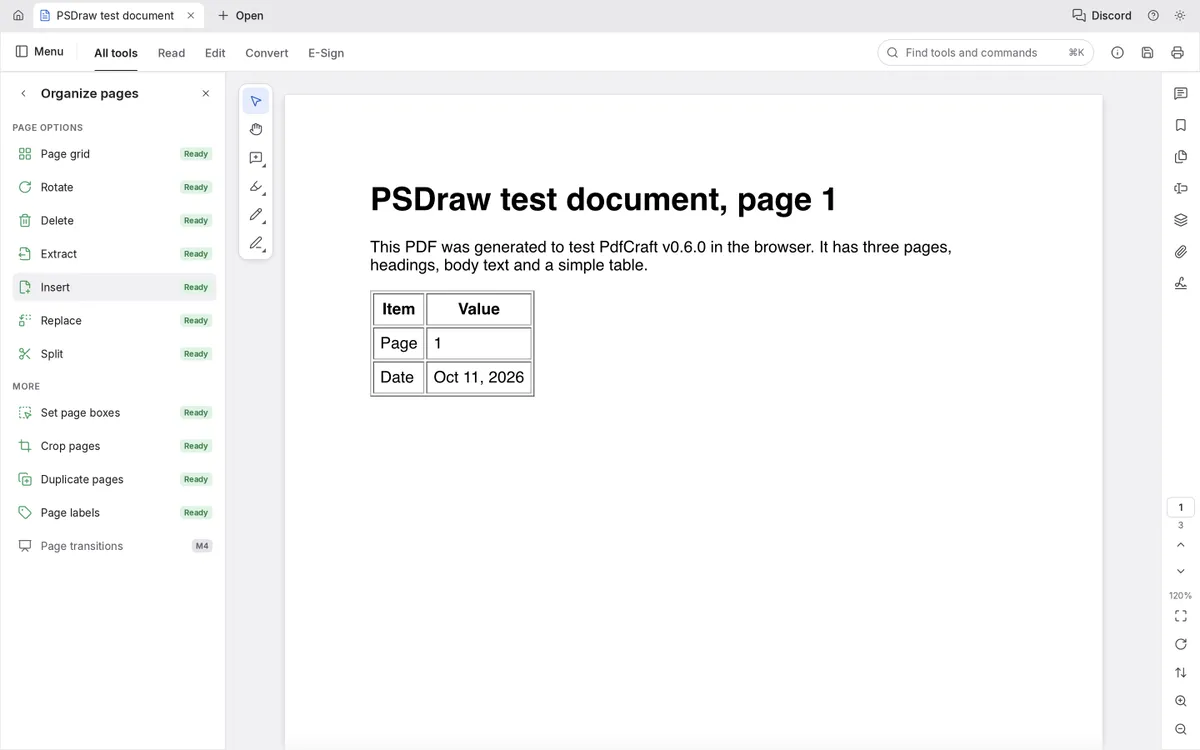
PdfCraft also fills forms, shows optional-content layers, and handles threaded comments. It supports the standard security handler from RC4 to AES-256, with user and owner passwords and permissions. The README lists basic digital signatures, redaction and sanitizing, printing and an accessibility checker as working today. For automation there is a CLI with JSON tool schemas, the MCP server and a Rust API. For a free Acrobat alternative at version 0.6, that list is longer than most people expect. In our own test of the v0.6.0 web build, a three-page PDF opened without errors, and the Organize pages panel marked rotate, delete, extract, insert, replace and split as Ready.
PdfCraft download: Windows, Mac, Linux and the browser version
Get every PdfCraft download from two places only: the PdfCraft page on getartcraft.com or the PdfCraft GitHub releases. PdfCraft v0.6.0 was published on Oct 11, 2026, a day after v0.5.0 and three days after v0.4.0.
On Windows the v0.6.0 release offers an MSI installer and a portable zip for x64, x86 and ARM64. On macOS there is one universal DMG, plus a separate zip for the command-line tool. Linux users get AppImage, deb, rpm, Flatpak and tar.gz builds for x86_64 and aarch64, and a tarball for riscv64. FreeBSD has an x86_64 tarball.
The browser version ships as a static site zip. The README says you can host it on any static server, so a team can run PdfCraft in the browser without installing anything on each laptop. Every release includes a SHA256SUMS.txt file. Compare the checksum before you open a PdfCraft download, and skip any site that offers a repackaged installer. Our ArtCraft download guide walks through the checksum step.
PdfCraft on GitHub
The PdfCraft GitHub repository lives at github.com/storytold/pdfcraft, under the same storytold account as the other ArtCraft apps. As of Oct 11, 2026 it had about 8,700 stars and 3,200 forks. Stars show attention, not quality, but the fork count suggests many developers are reading the PdfCraft code.
The code is offered under your choice of MIT or Apache-2.0. The ArtCraft name and logos are trademarks and are not part of that license, so a published fork has to rename itself. The ArtCraft open source guide explains that trademark exception in plain words.
PdfCraft on GitHub is also where you see how fast the project moves. The releases page shows v0.4.0 on Oct 8, v0.5.0 on Oct 10 and v0.6.0 on Oct 11, 2026. Issues and pull requests are open, so you can report a file that PdfCraft renders wrongly. The ArtCraft GitHub guide lists every sibling repository with live star counts.
Known limitations of the ArtCraft PDF editor
The PdfCraft README is unusually honest about gaps. Reliable editing of existing text is thin, especially for Chinese, Japanese, Korean and right-to-left scripts. OCR beyond Latin script is limited. There is no Office import or export, and the README warns that Word export loses layout.
Some password-protected files that Acrobat can open are not supported yet. Preflight, PDF/X, PDF/UA, full XFA forms, signature tokens and long-term validation are missing or thin, and printing on Windows is not ready. Pages are still drawn by a third-party crate called hayro while the project builds its own renderer. Fuzzing still finds crashes and hangs on hostile files, so do not open untrusted PDFs in PdfCraft yet.
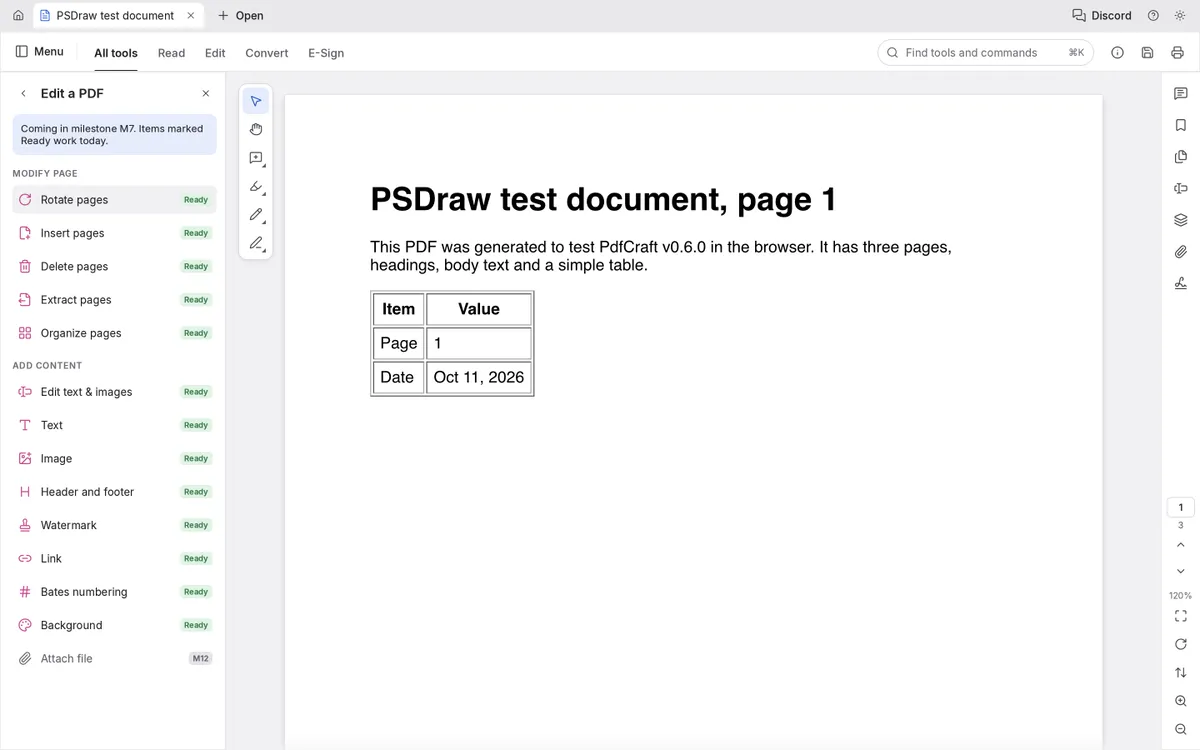
The app’s own Edit a PDF panel marks Edit text & images as Ready but says the full panel arrives in a later milestone; we did not test editing existing text in depth. In practice, PdfCraft is a good free Acrobat alternative for page work and forms, and a weak one for heavy text edits. If your job is converting a PDF to Word, keep another tool for now.
Other free Acrobat alternatives
PdfCraft is the newest free Acrobat alternative, not the only one. If you need the best alternative to Adobe Acrobat for a specific job, match the tool to the task rather than chasing one replacement.
For editing text and layout inside a PDF, LibreOffice Draw has long opened PDFs for editing on Windows, Mac and Linux. For reading and annotating, Okular on Linux and Sumatra PDF on Windows are lightweight open-source readers. Many people also use the browser’s built-in PDF viewer for quick fills and prints.
Every one of these alternatives to Adobe Acrobat DC has trade-offs. PdfCraft’s advantage is breadth in one app: page organization, forms, comments, redaction, encryption and signatures together, plus a browser build. Its disadvantage is age. For a wider list across all Adobe apps, see our ArtCraft alternatives guide, which also covers open source pdf editor options by platform.
Not to be confused with other "PDFCraft" tools
Several unrelated products use the same name, so search results for PdfCraft are mixed. The ArtCraft app on this page is the Rust desktop app from the storytold account. These four are different projects.
First, a browser-based PDF toolkit published as pdfcrafttool/pdfcraft, which advertises more than 80 privacy-first tools running in WebAssembly. Second, an iPhone and iPad app called PDFCraft on the App Store that scans, converts, merges and splits PDFs. Third, a Python library often written “PDF Craft” that turns scanned books into Markdown or EPUB. Fourth, a Ruby gem named pdfcraft that renders PDFs from templates in Rails apps.
None of them is the Acrobat clone from ArtCraft, and none is affiliated with it as far as their pages show. If you want the PdfCraft ArtCraft app, check that the download comes from getartcraft.com or the storytold GitHub account. A quick test: the real PdfCraft repository mentions Acrobat and Rust in its description.
FAQ
Is PdfCraft free?
Yes. Is PdfCraft free for commercial use too? The code is MIT or Apache-2.0, so yes, as long as you keep the license notices. The ArtCraft name and logo are not included.
Is PdfCraft a good Adobe Acrobat alternative?
For page work, forms, comments and redaction, PdfCraft is a useful Adobe Acrobat alternative already. For editing existing text or exporting to Office, it is not ready as of v0.6.0.
Can PdfCraft edit the text in a PDF?
Only in a limited way. The README lists reliable editing of existing text as a gap, especially for CJK and right-to-left scripts.
Does PdfCraft work in a browser?
Yes. Each release includes a static web build that runs in a modern browser, and the README says it can be hosted on any static server.
Is PdfCraft the same as the PDFCraft online PDF toolkit?
No. The online toolkit from pdfcrafttool is a separate project. PdfCraft from ArtCraft is a Rust desktop app published under the storytold GitHub account.
Can PdfCraft sign and redact PDFs?
Yes, at a basic level. The README lists basic digital signatures and redaction with sanitizing as working today. Signature tokens and long-term validation are still missing.
Is PdfCraft safe to download?
Download it only from getartcraft.com or the PdfCraft GitHub releases, and check the file against SHA256SUMS.txt. Avoid opening untrusted PDFs while the project still reports fuzzing crashes.
PdfCraft is the most complete free Acrobat alternative to appear this year, but it is still alpha. Use PdfCraft for organizing pages, filling forms and redacting, verify every download, and check back as the PdfCraft releases keep coming.
More ArtCraft guides
- ArtCraft vs AdobeArtCraft rebuilt Photoshop, Illustrator, Lightroom, Premiere and more as free open-source…
- Adobe CloneA developer used AI to clone seven Adobe apps as free open-source software. What the Adob…
- PhotoCraftPhotoCraft is ArtCraft's free, open-source Photoshop alternative. What it can do, how to…
- VectorCraftVectorCraft is ArtCraft's open-source Illustrator alternative built in Rust. Supported fi…
- LightCraftLightCraft is ArtCraft's open-source Lightroom alternative on GitHub. Supported RAW forma…
- GitHub ReposAll ArtCraft repositories on GitHub in one place — PhotoCraft, VectorCraft, LightCraft an…
- DownloadWhere to download ArtCraft safely: getartcraft.com, the ArtCraft Launcher, and GitHub rel…
- AlternativesLooking beyond ArtCraft? Compare the best free and paid alternatives for photo editing, v…
- Is It Open Source?Is ArtCraft really open source and free? What the MIT and Apache-2.0 licenses allow, the…
- Reddit ReviewsWhat Reddit says about ArtCraft and PhotoCraft: the praise, the doubts about AI-written c…
This page is an independent guide by PSDraw and is not affiliated with or endorsed by the ArtCraft Team or Adobe Inc. "ArtCraft" is a trademark of the ArtCraft Team.