EffectCraft: ArtCraft's Free After Effects Alternative, Online
Unofficial guide · Updated Oct 12, 2026 · 9 min read
EffectCraft is built for desktop. On a phone it may be slow or not open at all.
Open EffectCraft in your browser
Free, no account, no install. EffectCraft runs on your device, so your files stay on your computer.
EffectCraft is built for desktop. On a phone it may be slow or not open at all.
First load downloads about 18 MB. Works best in desktop Chrome or Edge.
PSDraw hosts the unmodified EffectCraft 0.8.0 web build by the ArtCraft team (MIT or Apache-2.0). Not made or endorsed by the ArtCraft team. License · Source on GitHub
TL;DR
EffectCraft is ArtCraft’s free, open-source After Effects alternative. As of Oct 12, 2026 it is alpha: nearly every feature exists, but it cannot open .aep projects.
- EffectCraft v0.8.0 runs on Windows, macOS, Linux, FreeBSD and in the browser; open it online from this page.
- The project says about 91% of After Effects features exist, and it is about 45% ready for professional work.
- Lottie import and export are built in; .aep files and After Effects plug-ins are not supported.
As of Oct 12, 2026
Question: Price
Short answer: Free and open source
Source: EffectCraft README
Question: Status
Short answer: Alpha
Source: EffectCraft README
Question: Latest release
Short answer: v0.8.0 (Oct 11, 2026)
Source: GitHub Releases
Question: Runs in a browser
Short answer: Yes, best in desktop Chrome or Edge
Source: Our test, Oct 12, 2026
Question: Opens .aep projects
Short answer: No
Source: EffectCraft README
The catch: the coverage numbers are the project’s own estimate, and nothing yet compares its renders with After Effects automatically.
https://getartcraft.com/apps/effectcraft
Verdict: Try EffectCraft for titles, motion graphics and Lottie work; keep After Effects for client projects, .aep files and third-party plug-ins.
EffectCraft is the motion graphics app in the ArtCraft suite: a free After Effects alternative written in Rust, with its first commit on Oct 1, 2026. Ten days later it had shipped nine releases and the EffectCraft repository passed 5,000 stars. This unofficial EffectCraft guide shows how to run EffectCraft online in your browser, what it can do today, how it compares with After Effects, which browsers work, and where to get the EffectCraft download for Windows, Mac and Linux. PSDraw is not affiliated with the ArtCraft team.
What is EffectCraft?
EffectCraft is a compositing and animation app from the team behind ArtCraft. Its GitHub description calls EffectCraft a clean-room reimplementation of Adobe After Effects, rebuilt in pure Rust. Clean room means the team worked from public documentation and observed behaviour, never from Adobe’s files, icons, presets or code. The README also says EffectCraft is independent and not affiliated with Adobe.
You build a composition from layers such as solids, shapes, text, footage and other compositions, animate their properties with keyframes, stack effects and render the result. The panels match what After Effects users know: Project, Composition, Timeline, Effect Controls and Effects & Presets, with the same shortcuts. That is why the EffectCraft ArtCraft release got attention from motion designers so quickly.
EffectCraft also differs from After Effects on purpose. Projects are saved as readable JSON files (.ecproj) that work well in version control. Every action is a command that a command-line tool, a JSON control channel or an MCP server for AI agents can run. Video codecs are pure Rust, with no FFmpeg inside. If you came from the Adobe clone story, EffectCraft is the After Effects piece of that suite.
Tested by the PSDraw team on Oct 12, 2026 with the official EffectCraft v0.8.0 web build (checksum verified).
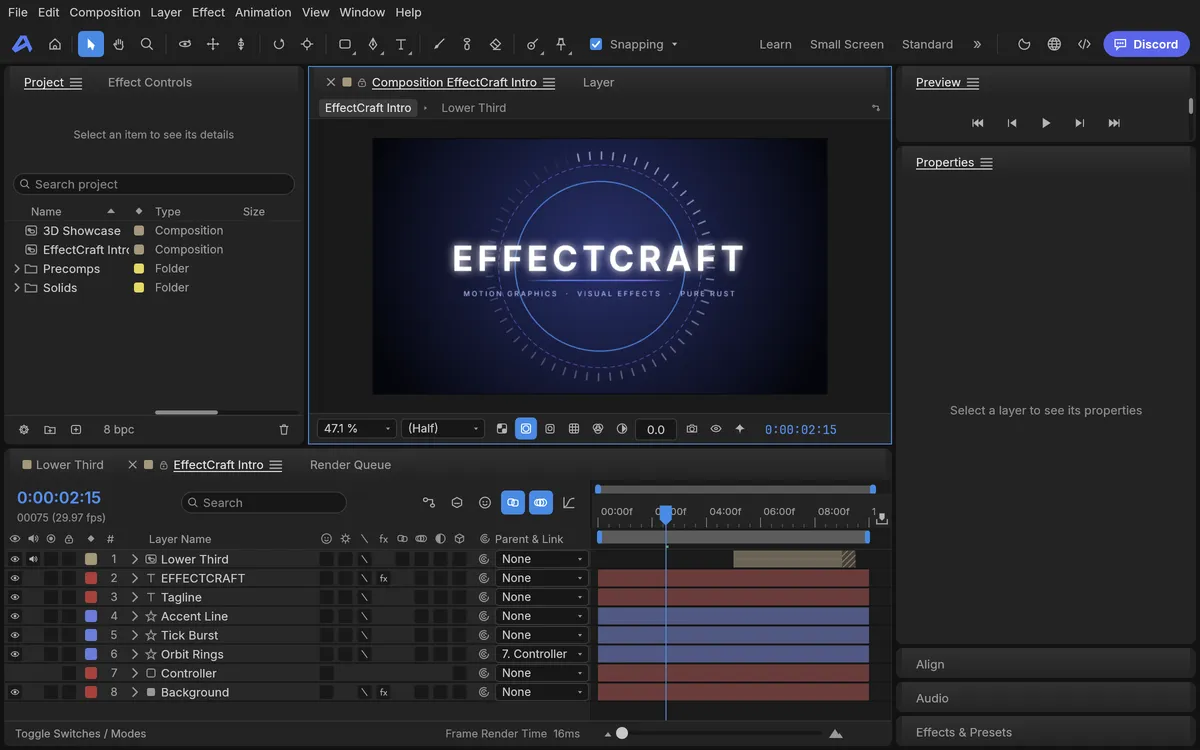
EffectCraft vs After Effects
EffectCraft vs After Effects is the first question most people ask. The EffectCraft README answers with its own estimate: about 91% of After Effects features exist, including all 298 of its effects, and the app is about 45% of the way to replacing After Effects for professional work. The README is careful to add that existing is not the same as behaving exactly like After Effects, and that this has not been measured yet.
The table below turns the README and the EffectCraft gap list into simple marks. EffectCraft wins on two rows: Lottie works without a plugin, and the app is free under MIT or Apache-2.0. It loses on opening existing After Effects work.
After Effects features present (~91%)
EffectCraft: Partial
After Effects: ✓
Ready for professional work (~45%)
EffectCraft: Partial
After Effects: ✓
Compositions, layers and keyframes
EffectCraft: ✓
After Effects: ✓
All 298 After Effects effects (306 in total)
EffectCraft: ✓
After Effects: ✓
Expressions with the After Effects object model
EffectCraft: ✓
After Effects: ✓
3D cameras and lights
EffectCraft: ✓
After Effects: ✓
Lottie import and export without a plugin
EffectCraft: ✓
After Effects: Partial
Render H.264 MP4 and ProRes MOV
EffectCraft: ✓
After Effects: ✓
Open .aep / .aepx projects
EffectCraft: ✗
After Effects: ✓
Third-party After Effects plug-ins
EffectCraft: ✗
After Effects: ✓
Free, MIT or Apache-2.0
EffectCraft: ✓
After Effects: ✗
| Feature | EffectCraft | After Effects |
|---|---|---|
| After Effects features present (~91%) | Partial | ✓ |
| Ready for professional work (~45%) | Partial | ✓ |
| Compositions, layers and keyframes | ✓ | ✓ |
| All 298 After Effects effects (306 in total) | ✓ | ✓ |
| Expressions with the After Effects object model | ✓ | ✓ |
| 3D cameras and lights | ✓ | ✓ |
| Lottie import and export without a plugin | ✓ | Partial |
| Render H.264 MP4 and ProRes MOV | ✓ | ✓ |
| Open .aep / .aepx projects | ✗ | ✓ |
| Third-party After Effects plug-ins | ✗ | ✓ |
| Free, MIT or Apache-2.0 | ✓ | ✗ |
As of Oct 11, 2026. Cells use only ✓, Partial, or ✗.
What EffectCraft can do today
Animation tools cover layers of every kind, including nulls, adjustment layers, cameras and lights, with parenting, track mattes, all 38 blend modes and motion blur. Keyframes behave as in After Effects: linear, Bezier, hold and roving keys, Easy Ease on F9 and a Graph Editor with value and speed graphs. Time remapping, shape layers with trim paths and repeaters, masks, text animators and puppet pins are all there.
The effects library lists 306 effects with After Effects’ parameter names and defaults, from Curves and Lumetri Color to Fractal Noise, CC Particle World and Timewarp, plus all nine layer styles. Expressions use JavaScript with the After Effects object model, so wiggle and loopOut work. Classic 3D has cameras with depth of field and lights with soft ray-traced shadows.
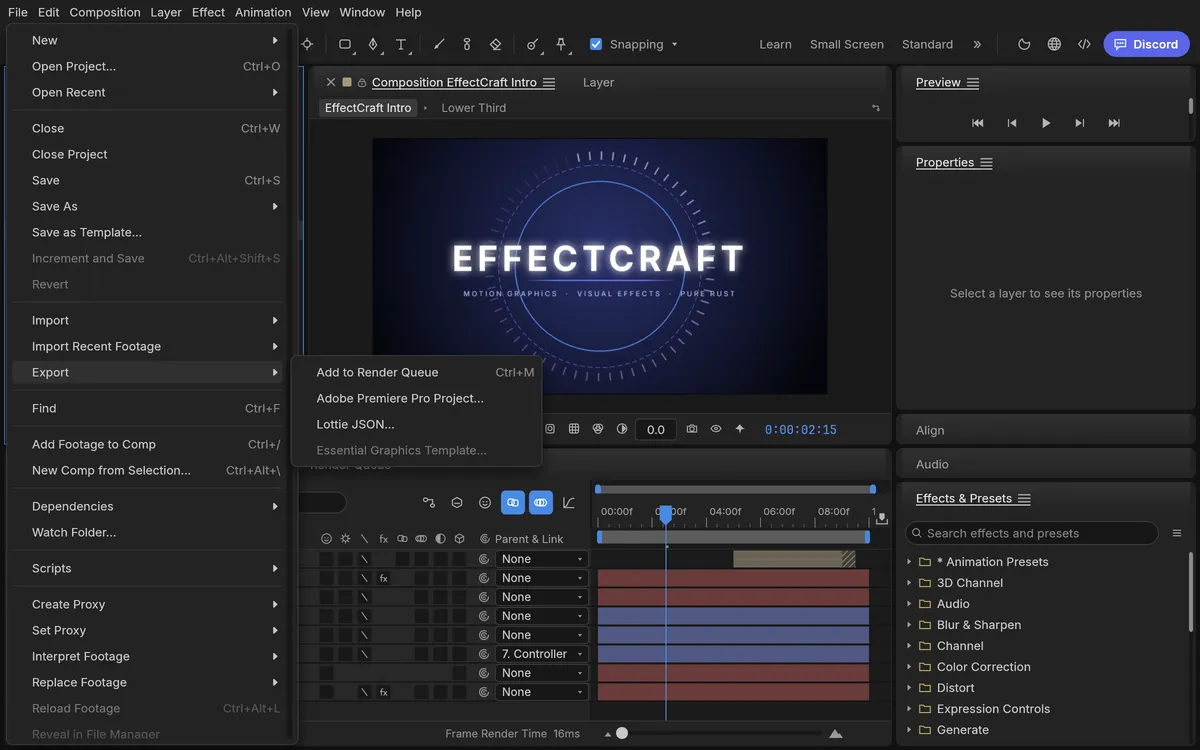
The Render Queue writes H.264 MP4, ProRes MOV with alpha, HEVC, AV1, WebM, image sequences up to 32-bit EXR, and animated GIF. Lottie goes both ways: File, Export, Lottie JSON writes a composition, and File, Import, Lottie opens one, which makes EffectCraft a capable free Lottie editor. In our test of the web build, the built-in intro composition played smoothly in Chrome.
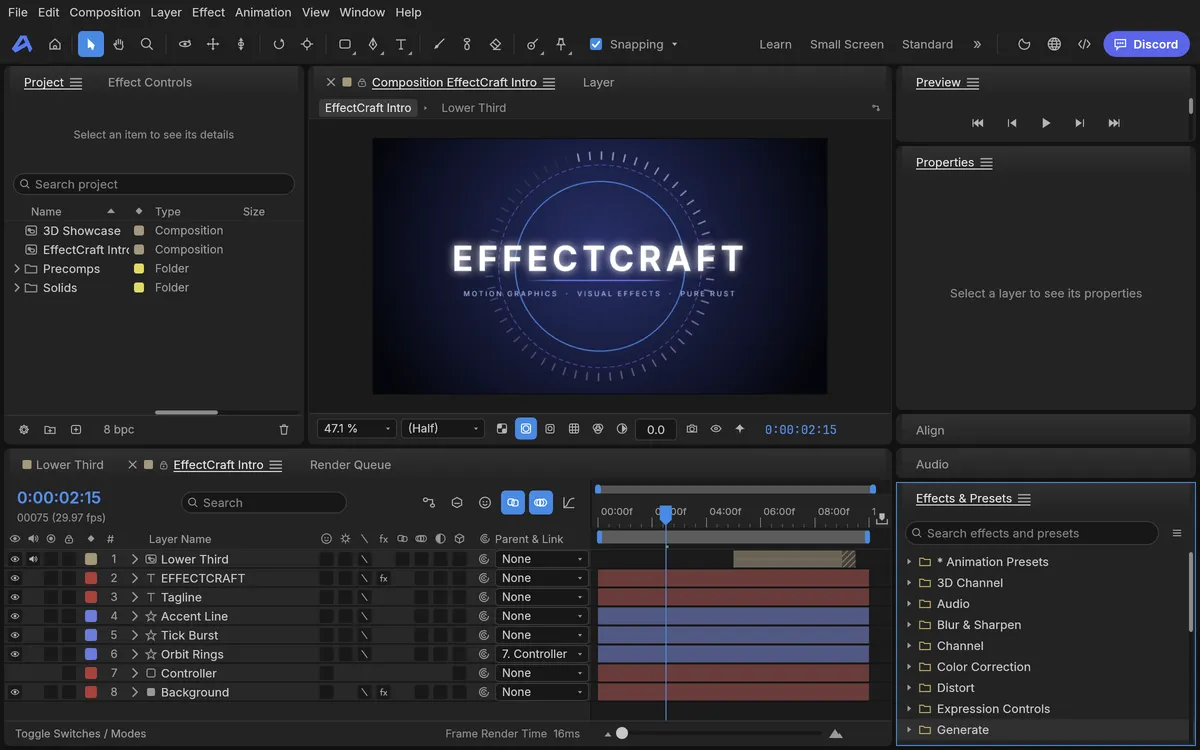
How to use EffectCraft online: your first animation
The fastest way to try this free After Effects alternative is our hosted copy of the official web build. Click the button at the top of this page or open EffectCraft online. The first visit downloads about 18 MB, then EffectCraft online opens in a new tab with a demo project: an EffectCraft Intro composition and a 3D Showcase.
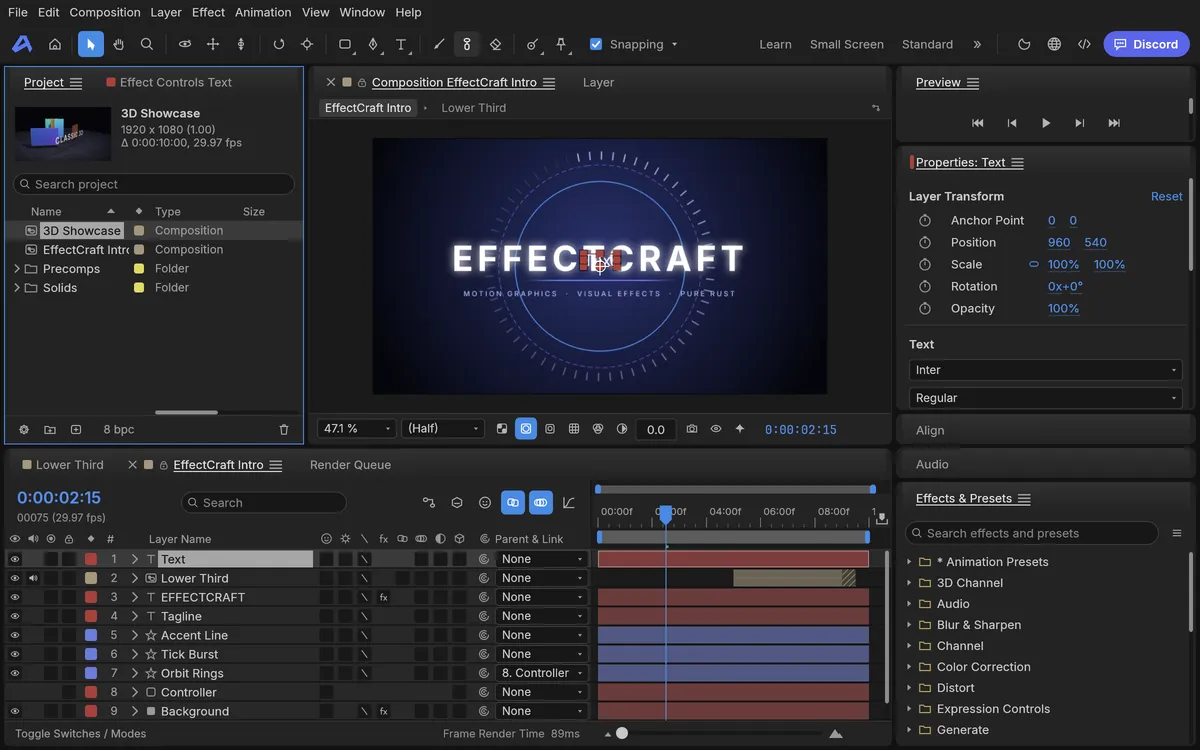
Step 1: press the Play button in the Preview panel to watch the intro animate. Step 2: choose Layer, then New, then Text. A Text layer appears at the top of the Timeline and its properties open on the right. Step 3: click the stopwatch next to Position to set a keyframe, move the playhead later in time and drag the text to a new place; EffectCraft adds the second keyframe for you, as After Effects does.
Step 4: press Play again to see your first animation. To share it, use File, Export, Lottie JSON for the web and apps, or add the composition to the Render Queue for video. Our own test covered playback and adding a Text layer; we did not run a full video render in the browser. The project stays in your browser’s storage, and the app restored it after a reload in our test.
EffectCraft download: Windows, Mac, Linux and the web
The README recommends the EffectCraft page on getartcraft.com as the easiest place for an EffectCraft download. For a specific build, use the EffectCraft releases on GitHub. EffectCraft v0.8.0 was published on Oct 11, 2026; v0.1.0 came out on Oct 2.
On Windows there are MSI installers and portable zips for x64, ARM64 and 32-bit x86, all code-signed. On macOS there is one universal DMG, signed and notarized, plus a command-line tool. Linux users get AppImage, Flatpak, deb, rpm and tar.gz builds for x86_64 and ARM64, and a RISC-V tarball. FreeBSD has its own tarball. On native Wayland sessions, file drag-and-drop does not work yet, so import with File, Import.
The web build is a static site zip, and that is the file PSDraw hosts, unchanged. Each release has a SHA256SUMS.txt file, so compare the checksum before you install, and skip any site that offers a repackaged installer. Our ArtCraft download guide walks through the checksum step.
EffectCraft on GitHub
The EffectCraft GitHub repository lives at github.com/storytold/effectcraft, under the same storytold account as PhotoCraft, FilmCraft and the other ArtCraft apps. It was created on Oct 1, 2026, and by Oct 12 it had about 5,400 stars and 2,700 forks. The effectcraft github page also shows the release pace: nine releases between Oct 2 and Oct 11.
The code is offered under your choice of MIT or Apache-2.0, which makes it a real open source After Effects alternative. The ArtCraft name and logo are trademarks outside that license, so forks must rename themselves; our ArtCraft open source guide explains the rule. EffectCraft shares its time model and video codecs with FilmCraft, the ArtCraft video editor.
Issues are open, and the README says bug reports are the most useful thing users can send right now. The project also keeps a public, ranked list of where it falls short of After Effects. The ArtCraft GitHub guide lists every sibling repository with live star counts.
Known limitations of EffectCraft
The biggest limit is plain in the README: EffectCraft cannot open .aep or .aepx projects, and After Effects plug-ins do not run. The gap list adds that .mogrt and .ffx files cannot be read either, so existing After Effects work does not carry over. Popular third-party effects such as Trapcode, Element and Saber have no equivalent host yet.
Behaviour still differs from After Effects in places, and nothing compares renders with After Effects automatically. macOS is the most tested platform; Linux and Windows users have hit basic interaction bugs that the team is fixing first. Users also report stutter on cached frames and slow scrubbing. For 3D models, EffectCraft reads glTF and OBJ, while After Effects also imports FBX and USD.
Roto Brush and face tracking use optional downloaded models that have not been compared with After Effects. The README’s own summary is fair: EffectCraft is a good place to try things and report what breaks, but it is not yet a replacement for After Effects on client work.
Which browsers can run EffectCraft online?
EffectCraft online uses WebGPU when the browser has it and falls back to WebGL2 by itself; on WebGL2, frames render on the processor, which is slower. The page can use at most 4 GiB of memory, shared by caches and decoded video frames, so long or heavy compositions are better on the desktop app.
In our tests on Oct 12, 2026, desktop Chrome 148 on a Mac ran the same official build we host, with WebGPU: the intro played and new layers worked. Once, the same tab had just run another ArtCraft app and EffectCraft reported that the graphics device was lost; its Reload button fixed it and restored the project. In Playwright’s build of Firefox, EffectCraft stayed on its loading screen even with the WebGL2 flag, while the six other Crafting Apps started. We have not tested Safari yet.
Our advice: use desktop Chrome or Edge, open EffectCraft in its own tab, and keep phones for watching, not editing.
FAQ
Is EffectCraft free?
Yes. EffectCraft costs nothing and its code is MIT or Apache-2.0, so commercial use is allowed. The ArtCraft name and logo are not part of that license.
Can EffectCraft open After Effects .aep projects?
No. The EffectCraft README says it cannot open .aep or .aepx files, and After Effects plug-ins do not run. Projects are saved in its own .ecproj JSON format.
Does EffectCraft work in a browser?
Yes. The official web build runs in desktop Chrome or Edge; open our hosted copy from the button at the top of this page. The first visit downloads about 18 MB.
Can EffectCraft export Lottie animations?
Yes. File, Export, Lottie JSON writes a composition as .json or .lottie and lists anything Lottie cannot express. File, Import, Lottie opens one as a new composition.
Is EffectCraft made by Adobe?
No. EffectCraft is an independent clean-room project from the ArtCraft team. Its README says it is not affiliated with, sponsored by or endorsed by Adobe.
Is EffectCraft safe to download?
Download it only from getartcraft.com or the storytold GitHub releases, and check the file against SHA256SUMS.txt. The Windows installers are code-signed and the Mac app is notarized.
EffectCraft is a serious new free After Effects alternative, but it is still alpha. Run EffectCraft online to try it in a minute, use it for titles and Lottie work, and keep After Effects for client projects and .aep files.
More ArtCraft guides
- ArtCraft vs AdobeArtCraft rebuilt Photoshop, Illustrator, Lightroom, Premiere and more as free open-source…
- Adobe CloneA developer used AI to clone seven Adobe apps as free open-source software. What the Adob…
- PhotoCraftPhotoCraft is ArtCraft's free, open-source Photoshop alternative. What it can do, how to…
- VectorCraftVectorCraft is ArtCraft's open-source Illustrator alternative built in Rust. Supported fi…
- LightCraftLightCraft is ArtCraft's open-source Lightroom alternative on GitHub. Supported RAW forma…
- PdfCraftPdfCraft is ArtCraft's free, open-source Acrobat alternative built in Rust. What it can d…
- WordCraftOpen WordCraft, ArtCraft's free open-source Microsoft Word alternative, right in your bro…
- FilmCraftTry FilmCraft, ArtCraft's free open-source Premiere Pro alternative, in your browser. Wha…
- GitHub ReposAll ArtCraft repositories on GitHub in one place — PhotoCraft, VectorCraft, LightCraft an…
- DownloadWhere to download ArtCraft safely: getartcraft.com, the ArtCraft Launcher, and GitHub rel…
- AlternativesLooking beyond ArtCraft? Compare the best free and paid alternatives for photo editing, v…
- Is It Open Source?Is ArtCraft really open source and free? What the MIT and Apache-2.0 licenses allow, the…
- Reddit ReviewsWhat Reddit says about ArtCraft and PhotoCraft: the praise, the doubts about AI-written c…
This page is an independent guide by PSDraw and is not affiliated with or endorsed by the ArtCraft Team or Adobe Inc. "ArtCraft" is a trademark of the ArtCraft Team.