SoundCraft: ArtCraft's Free Pro Tools Alternative, Online
Unofficial guide · Updated Oct 14, 2026 · 9 min read
SoundCraft is built for desktop. On a phone it may be slow or not open at all.
Open SoundCraft in your browser
Free, no account, no install. SoundCraft runs on your device, so your files stay on your computer.
SoundCraft is built for desktop. On a phone it may be slow or not open at all.
First load downloads about 6 MB. Works best in desktop Chrome or Edge.
PSDraw hosts the unmodified SoundCraft 0.6.1 web build by the ArtCraft team (MIT or Apache-2.0). Not made or endorsed by the ArtCraft team. License · Source on GitHub
TL;DR
SoundCraft is ArtCraft’s free, open-source Avid Pro Tools alternative in Rust. As of Oct 14, 2026 it is pre-alpha: the editing, mixing and plugin set are real, but no MIDI device I/O and no Pro Tools session exchange.
- SoundCraft v0.6.1 runs on Windows, macOS, Linux and in the browser; open it online from this page.
- Shuffle/Slip/Spot/Grid modes, automation, EQ/compressor/limiters, piano-roll MIDI, WAV/AIFF/FLAC bounce.
- Code is MIT or Apache-2.0; the ArtCraft name and logo are not covered.
As of Oct 14, 2026
Question: Price
Short answer: Free and open source
Source: SoundCraft README
Question: Status
Short answer: Pre-alpha
Source: SoundCraft README
Question: Latest release
Short answer: v0.6.1 (Oct 12, 2026)
Source: GitHub Releases
Question: Runs in a browser
Short answer: Yes, open it from this page
Source: Our test, Oct 14, 2026
Question: Opens .ptx / AAF / OMF sessions
Short answer: No
Source: SoundCraft gap list
The catch: the gap list marks missing MIDI device I/O, no low-latency duplex routing and no AAF/OMF/.ptx exchange as alpha blockers — recording hardware and Pro Tools studios stay outside its reach for now.
https://getartcraft.com/apps/soundcraft
Verdict: Try SoundCraft for editing and mixing with real Pro Tools-style workflow in the browser; keep Pro Tools for tracking through hardware and studio session exchange.
SoundCraft is the audio workstation in the ArtCraft Crafting Apps suite: a free Avid Pro Tools alternative written in pure Rust and released on GitHub on Oct 7, 2026. This unofficial SoundCraft guide shows how to open SoundCraft online in your browser, what it can record and mix today, how SoundCraft vs Pro Tools compares row by row, and where to get the SoundCraft download for Windows, Mac and Linux. Everything here comes from the SoundCraft README, its public gap list and our own test of the official web build on Oct 14, 2026. PSDraw is not affiliated with the ArtCraft team.
What is SoundCraft?
SoundCraft is a digital audio workstation from the team behind ArtCraft, the group that released free, open-source counterparts to Photoshop, Word, Excel, AutoCAD and other Adobe, Microsoft and Autodesk apps in October 2026. The GitHub description calls it a clean-room reimplementation of Avid Pro Tools, rebuilt in pure Rust. Clean-room means it was built from public specifications and observed behaviour, not from Avid code, and the README says SoundCraft is not affiliated with or endorsed by Avid.
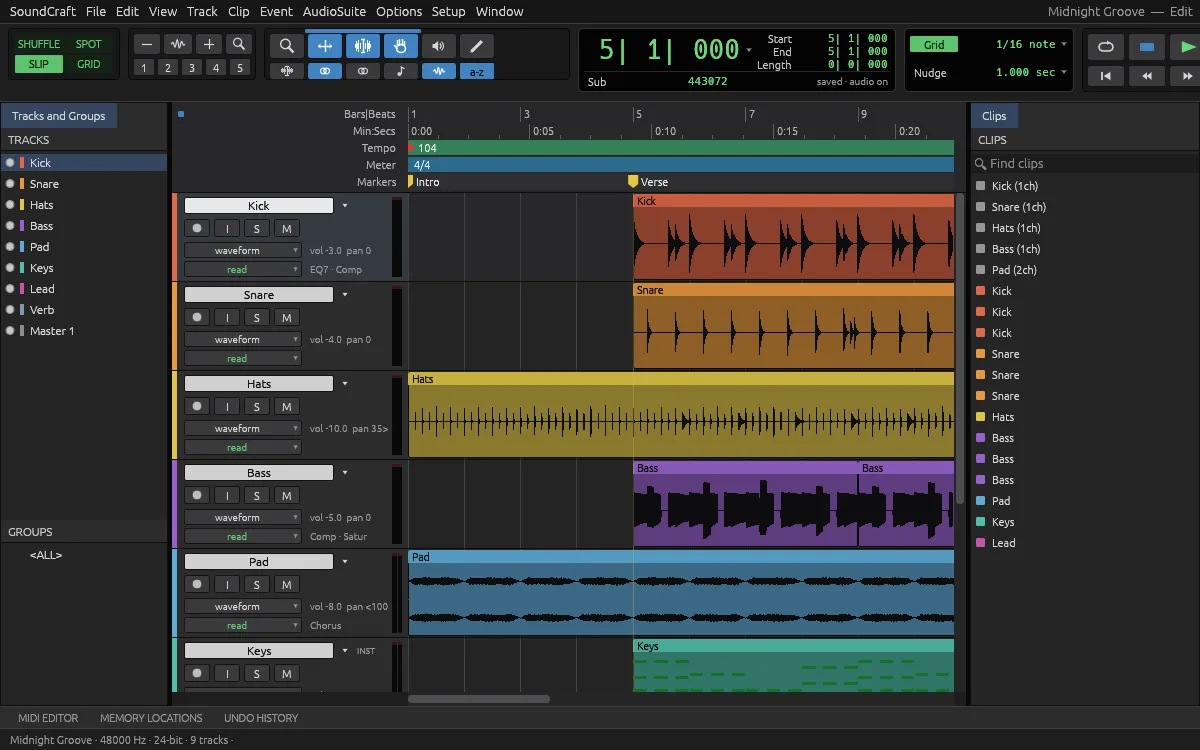
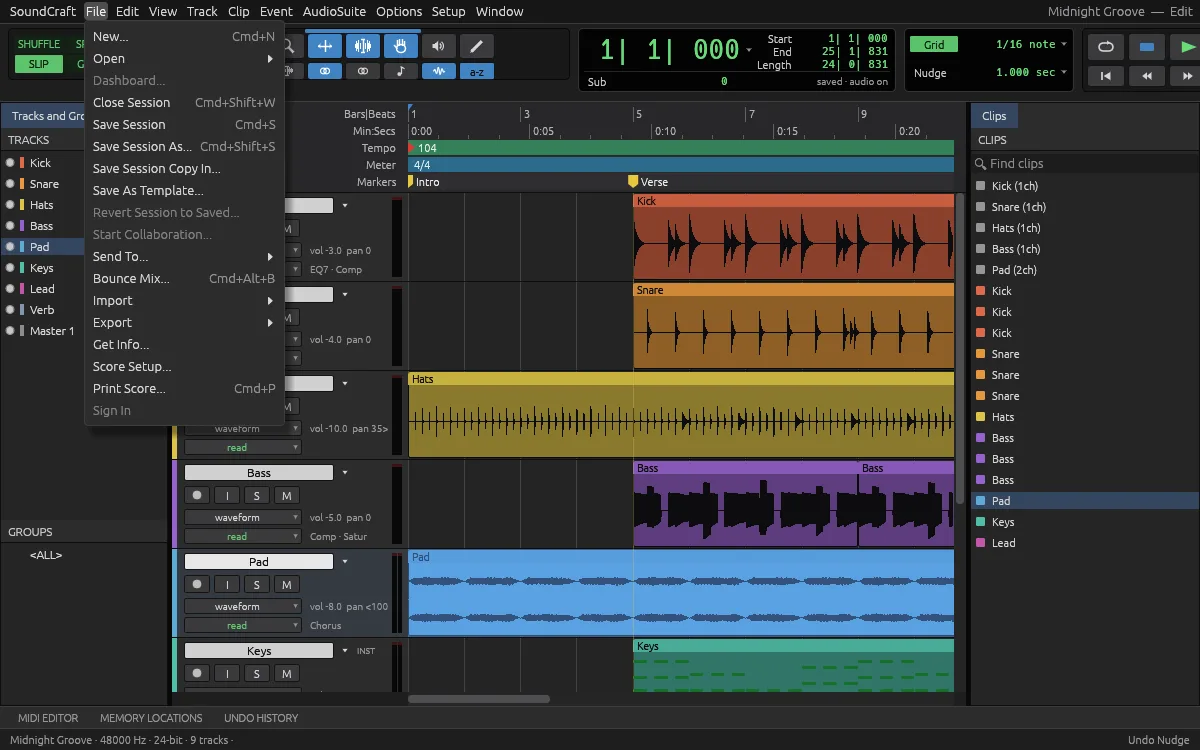
The workflow is Pro Tools-shaped on purpose: an Edit window with tracks and clips, Shuffle, Slip, Spot and Grid edit modes, the Smart Tool, a big transport with Bars|Beats and timecode rulers, and a mixer with sends and busses. One Rust codebase runs natively on macOS, Windows and Linux and compiles to WebAssembly for the browser; the README claims a parallel mix engine and a 120 fps UI.
Our test of the web build opened a sample session — Midnight Groove, 48 kHz, 24-bit, 9 tracks — with waveforms rendered, tracks armed and the transport ready. For a browser tab, that is not a normal sight.
Tested by the PSDraw team on Oct 14, 2026 with the official SoundCraft v0.6.1 web build (checksum verified).
SoundCraft vs Avid Pro Tools
SoundCraft vs Pro Tools is a question of where your audio lives. For files already on your computer, editing and mixing are genuinely there: the edit modes, automation, plugin set and bounce chain all work. What is missing is the studio edge — MIDI hardware, low-latency duplex recording and Pro Tools session interchange, all named alpha blockers.
The table below turns the SoundCraft README and its ranked gap list into simple marks. Pro Tools keeps a yes on hardware and interchange; SoundCraft wins the last row outright.
Shuffle, Slip, Spot and Grid edit modes
SoundCraft: ✓
Pro Tools: ✓
Fader/pan automation, sends and busses
SoundCraft: ✓
Pro Tools: ✓
Piano-roll MIDI editor
SoundCraft: ✓
Pro Tools: ✓
MIDI device input and output
SoundCraft: ✗
Pro Tools: ✓
Low-latency duplex channel routing
SoundCraft: ✗
Pro Tools: ✓
Session exchange: AAF, OMF, .ptx
SoundCraft: ✗
Pro Tools: ✓
Third-party VST3 plugins
SoundCraft: Partial
Pro Tools: ✓
Bounce WAV/AIFF/FLAC with dither
SoundCraft: ✓
Pro Tools: ✓
Free, MIT or Apache-2.0
SoundCraft: ✓
Pro Tools: ✗
| Feature | SoundCraft | Pro Tools |
|---|---|---|
| Shuffle, Slip, Spot and Grid edit modes | ✓ | ✓ |
| Fader/pan automation, sends and busses | ✓ | ✓ |
| Piano-roll MIDI editor | ✓ | ✓ |
| MIDI device input and output | ✗ | ✓ |
| Low-latency duplex channel routing | ✗ | ✓ |
| Session exchange: AAF, OMF, .ptx | ✗ | ✓ |
| Third-party VST3 plugins | Partial | ✓ |
| Bounce WAV/AIFF/FLAC with dither | ✓ | ✓ |
| Free, MIT or Apache-2.0 | ✓ | ✗ |
As of Oct 14, 2026. Cells use only ✓, Partial, or ✗.
What SoundCraft can do today
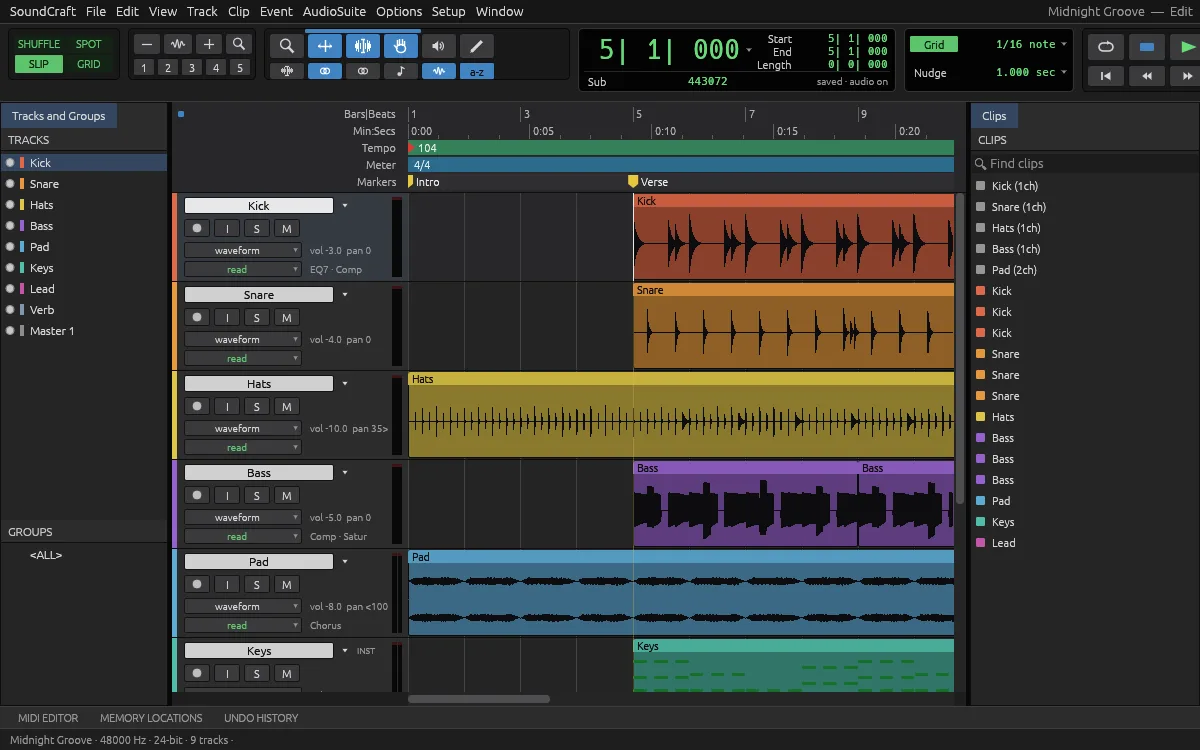
Editing is the foundation: Shuffle, Slip, Spot and Grid modes; Smart, Selector, Grabber, Trim, Pencil and Zoom tools; clips that fade, crossfade, nudge and quantize to grid. The transport understands Bars|Beats, Min:Secs, timecode at every rate including drop-frame, and samples.
Mixing is real: fader and pan with full automation (Write, Touch, Latch and more), pre and post sends, busses, aux inputs and master faders. The built-in plugin set covers a 7-band and 1-band EQ, compressor/limiter, expander/gate, de-esser and maximizer. MIDI is present as instrument tracks with a piano-roll editor, velocity lane and event list.
Files and delivery round it out: WAV/BWF/RF64, AIFF/AIFC and FLAC in and out; decoding for MP3, Ogg, AAC, ALAC and more; bounce to WAV, AIFF or FLAC at 16/24/32-bit float with dither. Recording supports punch-in and loop workflows on the desktop build. If you map the family, SoundCraft is the Pro Tools sibling; our Adobe clone story covers the whole suite.
How to use SoundCraft online: your first mix
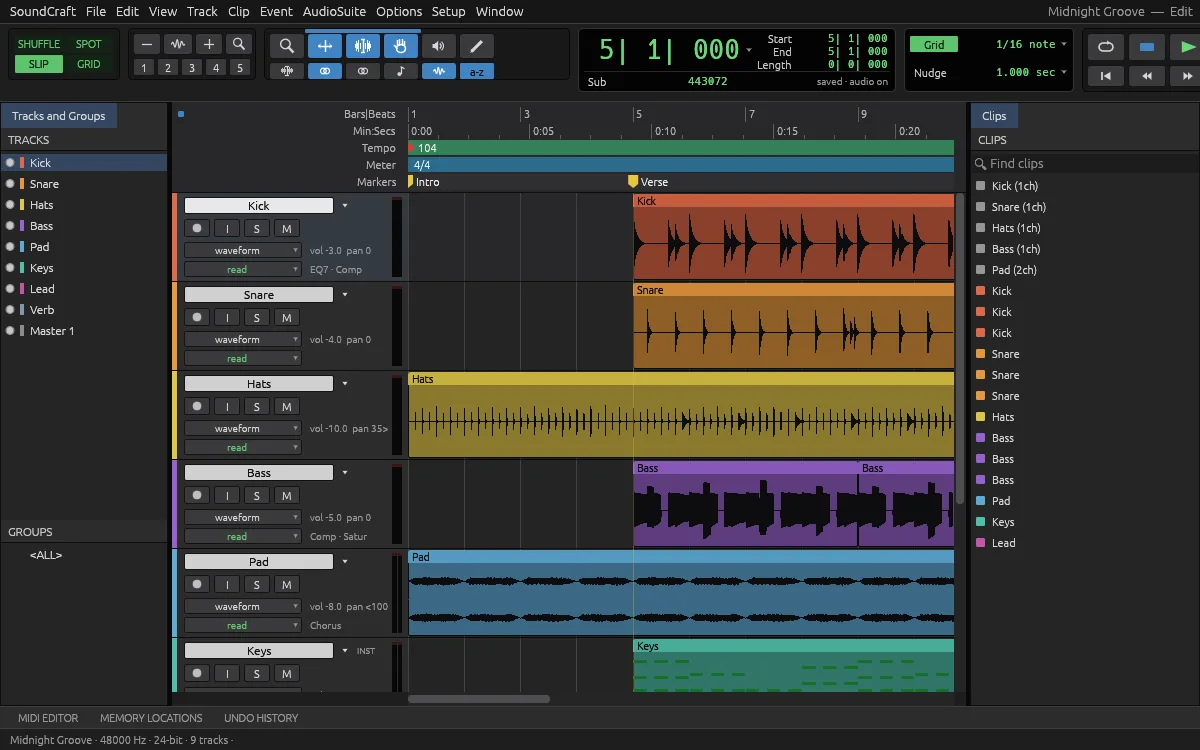
The quickest way is our hosted copy of the official web build — a free Pro Tools alternative online with no account. Click the button at the top of this page or open SoundCraft online. The first visit downloads about 6 MB, then the workstation opens in a new tab with a sample session loaded. SoundCraft online works best in desktop Chrome or Edge.
Step 1: press the spacebar to play the sample session and hear the mix. Step 2: drag a clip in Grid mode and watch it snap to the Bars|Beats ruler. Step 3: open a track’s sends and route it to an aux, then automate the fader with Touch mode.
Step 4: import your own audio with File, then Import — WAV, AIFF and FLAC are the safest formats. There is no autosave in the web build, so save often: Save downloads a session copy, because the browser cannot write over your original. Recording through an audio interface belongs to the desktop build, not the browser.
SoundCraft download: Windows, Mac, Linux and the web
Get every SoundCraft download from the SoundCraft releases on GitHub or the SoundCraft page on getartcraft.com. SoundCraft v0.6.1 was published on Oct 12, 2026, five days after the repository appeared — audio engineers picked it up fast, so check the tag before you bookmark an installer.
On Windows there are MSI installers and portable zips for x64, ARM64 and 32-bit x86. On macOS there is one universal DMG, plus a separate command-line tool. Linux users get AppImage, Flatpak, deb, rpm and tar.gz builds for x86_64 and ARM64, plus a RISC-V tarball, and FreeBSD has its own build.
The web build is a static site zip; that is the file PSDraw hosts, unchanged and checksum-verified. Every release includes SHA256SUMS.txt, so compare the checksum before you install. Our ArtCraft download guide walks through the checksum step for every ArtCraft app.
SoundCraft on GitHub
The SoundCraft GitHub repository is github.com/storytold/soundcraft, under the same storytold account as PhotoCraft and the other Crafting Apps. It was created on Oct 7, 2026 and passed 2,600 stars within a week — audio engineers noticed fast, because a browser-run Pro Tools-style DAW is not something the open-source world had.
The code is offered under your choice of MIT or Apache-2.0. The ArtCraft name and logo are trademarks outside that license, and our ArtCraft open source guide explains the fork rules. The gap list ranks its blockers in the open, from MIDI hardware to session interchange, and doubles as the public roadmap.
SoundCraft is also scriptable: the same commands drive the UI, a CLI, a JSON control channel and an MCP server, so an agent can reach the same mixing surface you click. Our ArtCraft MCP guide shows how to point Claude, Codex or Cursor at it.
Known limitations of SoundCraft
The gap list marks the studio edges as alpha blockers: there is no MIDI device input or output, no channel routing or low-latency duplex path (device and buffer choice exist; ASIO is opt-in), and no session exchange with Pro Tools — no AAF, OMF or .ptx.
Ecosystem and depth gaps follow: third-party VST3s are blocked in the signed macOS build and AU editors are missing, the built-in plugin catalogue is thin and unverified, and roughly 25 open correctness bugs touch features counted as done. Recording decodes sources whole into RAM, so long sessions are memory-hungry. Localization is English-only.
Two limits are specific to SoundCraft online. Save downloads a session copy instead of writing over your original. And SoundCraft is built for desktop: on a phone it may be slow or not open at all. Mix in the SoundCraft browser build freely, but track through the desktop app until MIDI hardware support lands.
Which browsers can run SoundCraft online?
The SoundCraft web build runs in any modern desktop browser on WebAssembly. The project’s hosting notes say the build needs no cross-origin isolation headers, so plain static hosting is enough — that is how we serve it.
Desktop Chrome and Edge are what we verified for SoundCraft online on Oct 14, 2026, and they matter more for audio than usual: browser audio latency varies by platform and interface. Wired headphones or monitors beat Bluetooth for latency in every browser we tried SoundCraft in. Firefox and Safari can run WebAssembly builds of this kind, but the project does not claim they are tested.
Phones and tablets are not the target: a DAW needs a wide timeline, a mouse and keyboard shortcuts. The launch block on this page warns mobile visitors for that reason. A portable recorder or a laptop DAW remains the right tool for capturing audio on the go.
FAQ
Is SoundCraft free?
Yes. SoundCraft costs nothing and its code is MIT or Apache-2.0, so you can use it at work too. The ArtCraft name and logo are not part of that license.
Can I use SoundCraft online without installing it?
Yes. The official web build runs in your browser. Use the button at the top of this page to open our hosted copy; the first visit downloads about 6 MB.
Does SoundCraft open Pro Tools sessions?
No. SoundCraft has no session exchange with Pro Tools — AAF, OMF and .ptx support is a named alpha blocker. WAV, AIFF and FLAC audio moves between the two fine.
Can SoundCraft record through my audio interface?
In the desktop build, yes, with punch-in and loop workflows; the browser build is for editing and mixing, not hardware recording. MIDI device I/O and low-latency duplex routing are still on the roadmap.
Is SoundCraft made by Avid?
No. ArtCraft SoundCraft is an independent clean-room project; its README says it is not affiliated with, sponsored by or endorsed by Avid.
Are my sessions uploaded when I use SoundCraft online?
No. In our test on Oct 14, 2026, opening and mixing a session in the same official build we host sent no upload request; the only network traffic was the app’s own files. Exports arrive as browser downloads.
Is SoundCraft safe to download?
Download it only from the storytold GitHub releases or getartcraft.com, and check the file against SHA256SUMS.txt. Avoid sites that offer repackaged installers.
SoundCraft is a real Pro Tools-style workflow running in a browser tab — remarkable for a pre-alpha — but studio hardware and session interchange are not there yet. Open SoundCraft online to mix the sample session in a minute, and keep Pro Tools for tracking and studio exchange.
More ArtCraft guides
- ArtCraft vs AdobeArtCraft rebuilt Photoshop, Illustrator, Lightroom, Premiere and more as free open-source…
- Adobe CloneA developer used AI to clone seven Adobe apps as free open-source software. What the Adob…
- PhotoCraftPhotoCraft is ArtCraft's free, open-source Photoshop alternative. What it can do, how to…
- VectorCraftVectorCraft is ArtCraft's open-source Illustrator alternative built in Rust. Supported fi…
- LightCraftLightCraft is ArtCraft's open-source Lightroom alternative on GitHub. Supported RAW forma…
- PdfCraftPdfCraft is ArtCraft's free, open-source Acrobat alternative built in Rust. What it can d…
- WordCraftOpen WordCraft, ArtCraft's free open-source Microsoft Word alternative, right in your bro…
- EffectCraftRun EffectCraft, ArtCraft's free open-source After Effects alternative, in your browser.…
- FilmCraftTry FilmCraft, ArtCraft's free open-source Premiere Pro alternative, in your browser. Wha…
- GridCraftOpen GridCraft, ArtCraft's free open-source Excel alternative, in your browser. Native XL…
- DeckCraftRun DeckCraft, ArtCraft's free open-source PowerPoint alternative, in your browser. Build…
- CADCraftTry CADCraft, ArtCraft's free open-source AutoCAD alternative, in your browser. Command-l…
- DesignCraftOpen DesignCraft, ArtCraft's free open-source InDesign alternative, in your browser. Page…
- FigCraftOpen FigCraft, ArtCraft's free open-source Figma alternative, in your browser. Interface…
- ArtCraft MCPEvery Crafting App ships an MCP server in its CLI. Set up one client config for Claude, C…
- GitHub ReposAll ArtCraft repositories on GitHub in one place — PhotoCraft, VectorCraft, LightCraft an…
- DownloadWhere to download ArtCraft safely: getartcraft.com, the ArtCraft Launcher, and GitHub rel…
- AlternativesLooking beyond ArtCraft? Compare the best free and paid alternatives for photo editing, v…
- Is It Open Source?Is ArtCraft really open source and free? What the MIT and Apache-2.0 licenses allow, the…
- Reddit ReviewsWhat Reddit says about ArtCraft and PhotoCraft: the praise, the doubts about AI-written c…
This page is an independent guide by PSDraw and is not affiliated with or endorsed by the ArtCraft Team or Adobe Inc. "ArtCraft" is a trademark of the ArtCraft Team.