SolidCraft: Open-Source Parametric CAD, From GitHub to Your First Part
Unofficial guide · Updated Oct 18, 2026 · 9 min read
TL;DR
SolidCraft is a free, open-source parametric 3D CAD application written in pure Rust: sketch, constrain, build a feature timeline, and export STEP — on the desktop or in a browser tab.
- The SolidCraft GitHub repository is tangency-labs/solidcraft, MIT or Apache-2.0, at 4.7k stars when we looked.
- Version 0.15.0 shipped on Oct 17, 2026 with a new design file format; older designs still open.
- An MCP server lets an AI agent model, measure and export inside the same running app.
As of Oct 18, 2026
Question: Licence
Short answer: MIT or Apache-2.0
Source: Repository README
Question: Latest release
Short answer: v0.15.0, Oct 17, 2026
Source: GitHub Releases
Question: Runs in a browser
Short answer: Yes, at solidcraft.io/app
Source: Project website
Question: Exports STEP
Short answer: Yes, AP242
Source: Repository README
Question: Signed installers
Short answer: No, not yet
Source: Repository README
The catch: SolidCraft is a modelling tool, not a product lifecycle suite. There is no CAM, no simulation study and no cloud review, and its installers are unsigned, so your operating system will warn you the first time.
https://github.com/tangency-labs/solidcraft
Verdict: Try SolidCraft if you want parametric CAD you can own, script and run in a browser; keep Fusion 360 if your work depends on CAM, drawings and a team that shares files in the cloud.
SolidCraft is the CAD app that keeps turning up in the same breath as ArtCraft: an open-source parametric 3D modeller in pure Rust, with a desktop build, a browser build and an MCP server for AI agents. People searching for the solidcraft github page usually want three things — the repository, the download and an honest read on whether it replaces Fusion 360. This guide answers all three, using the repository README, the v0.15.0 release assets published on Oct 17, 2026, and the project’s own documentation. SolidCraft is not made by PSDraw, and it is not part of the ArtCraft suite; it is a separate project under Tangency Labs.
What SolidCraft is
SolidCraft CAD is parametric modelling in the SolidWorks tradition: you draw a sketch, dimension it, constrain it, then build solids on a feature timeline that rebuilds when a parameter changes. The difference is the stack underneath. SolidCraft is written entirely in Rust, renders through a GPU compositor, and compiles to WebAssembly so the same editor runs in a browser tab.
The SolidCraft workflow is the familiar four steps the project puts on its own site: sketch, build, refine, exchange. Sketches live on origin planes, offset planes or planar faces and support lines, rectangles, circles, arcs, polygons, slots, ellipses, splines and text. Features include extrude, revolve, sweep, loft, fillet and chamfer, shell, draft, holes, threads, patterns, mirrored copies, split and combine. Every feature is editable, and the timeline rebuilds incrementally rather than from scratch.
Two details make SolidCraft CAD more than a demo. The constraint solver is the project’s own, not a wrapper around a commercial kernel, and the B-rep kernel is the open-source truck boundary representation. Those choices are why the app can be MIT or Apache-2.0 and still export real STEP files. In a market where parametric CAD is usually rented by the month, that is the whole pitch.
The SolidCraft GitHub repository
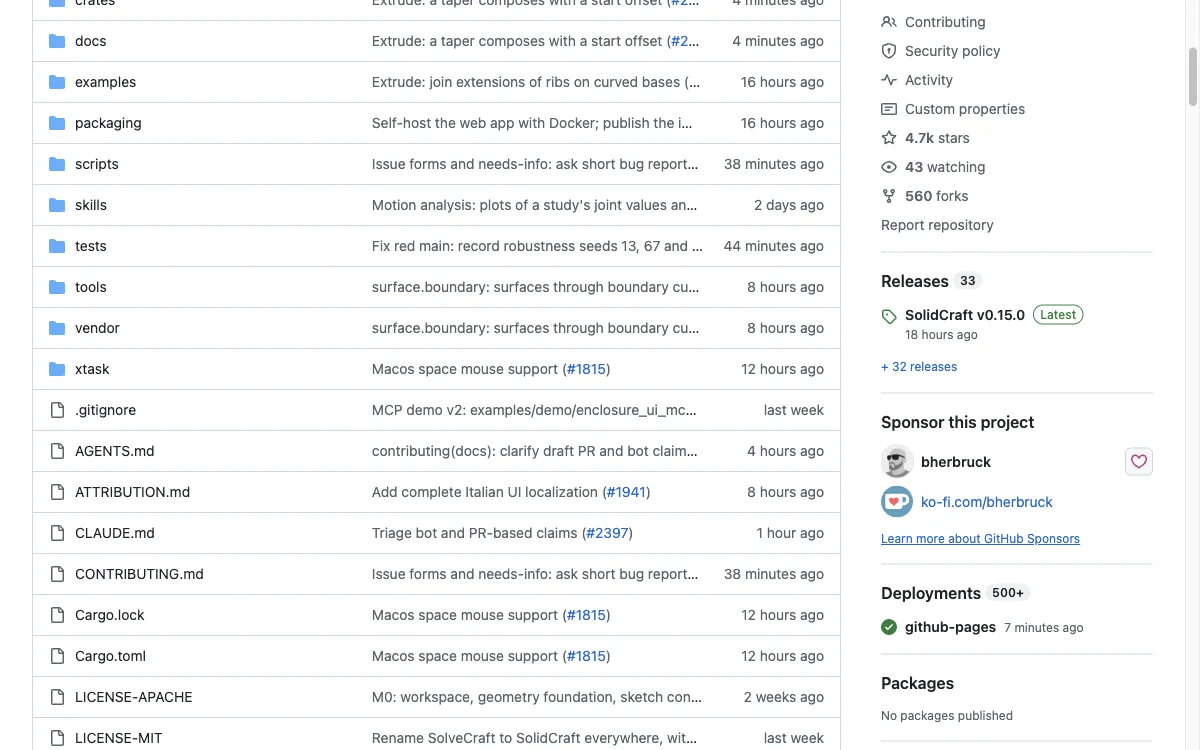
The SolidCraft GitHub repository is github.com/tangency-labs/solidcraft. When we looked on Oct 18, 2026 it showed 4.7k stars, 560 forks and 33 releases, with 659 open issues and an active pull-request queue. The licence is MIT or Apache-2.0 at your option, developed under clean-room contribution rules, which matters if you plan to vendor it into a product.
The move to Tangency Labs is recent, and any older SolidCraft GitHub link you saved is worth re-checking. Release notes for v0.15.0 say SolidCraft now lives at tangency-labs/solidcraft and that old links redirect, but versions 0.14.0 and older have an in-app update check that does not follow the move. If you are on an older build, download 0.15.0 by hand once; from that version on, the update check follows the new home.
The SolidCraft GitHub repository is also where the roadmap lives. The README is unusually candid: it lists what works, points at the roadmap for known limitations, and publishes an attribution file for third-party components. If you are evaluating SolidCraft for a team, read the issues first. The volume is high, and it tells you more about maturity than the star count does.
Checked by the PSDraw team on Oct 18, 2026 against the tangency-labs/solidcraft repository, its v0.15.0 release assets and the published README.
SolidCraft download and install
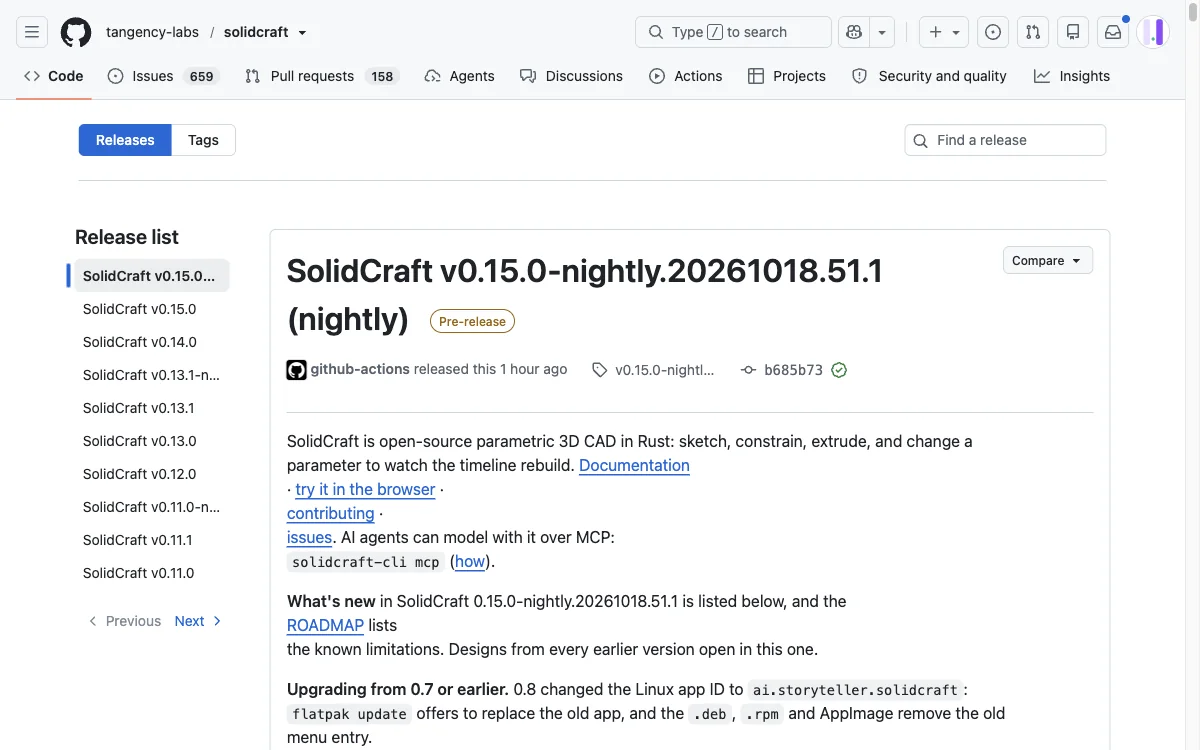
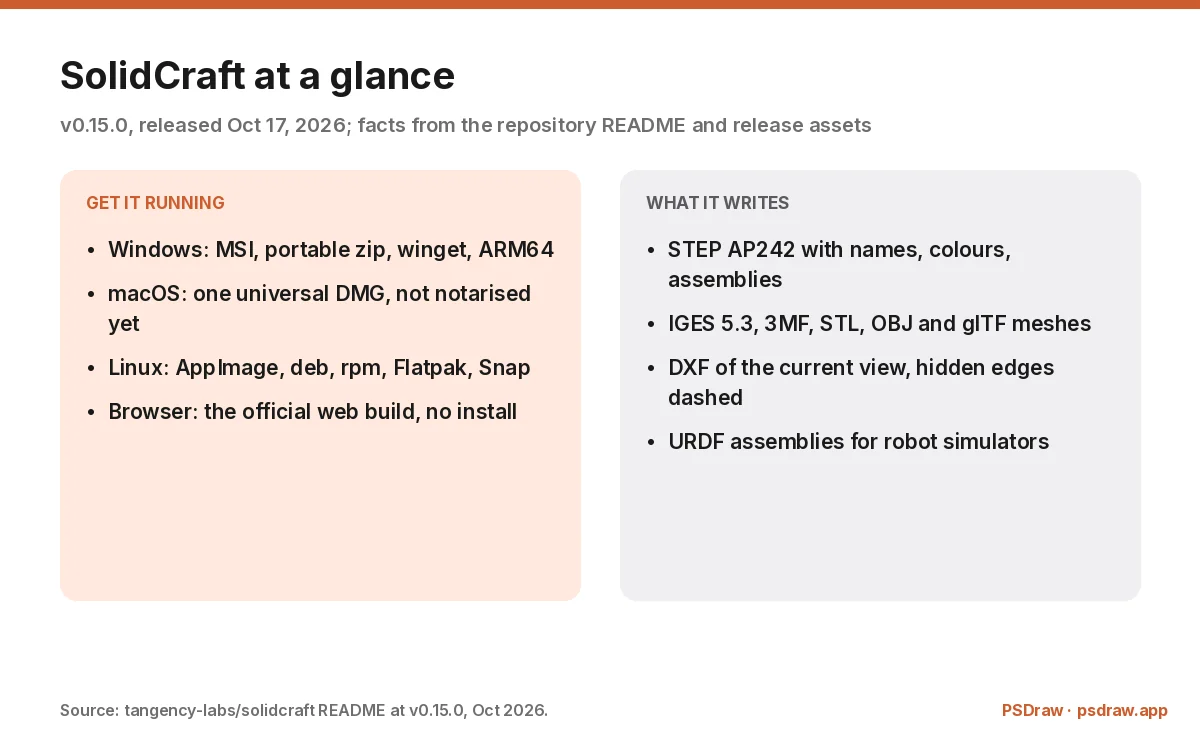
The SolidCraft download is published on the SolidCraft GitHub releases page, with the latest stable v0.15.0 and nightly builds beside it. Windows gets an MSI plus a portable zip, for x64, arm64 and x86, and a winget package: winget install bherbruck.SolidCraft. macOS gets one universal DMG for Apple silicon and Intel. Linux gets an AppImage, deb, rpm, Flatpak and Snap, with arm64 builds for the ARM machines that need them.
The installers are not signed yet, and the README says so plainly. On Windows, SmartScreen will warn you and the path is More info, then Run anyway. On macOS, the first launch needs a right-click and Open rather than a double-click. That is ordinary for a young open-source project, and it is still a real friction point for a managed machine where you cannot click through a warning.
Every SolidCraft release ships SHA256SUMS.txt, so the SolidCraft download can be checked before it runs. If you are installing the SolidCraft desktop build on a work laptop, check the hash and keep the file with your software inventory. A checksum does not make an unsigned build safe in the way a notarised one is, but it does prove the bytes are the bytes the SolidCraft repository published.
SolidCraft in the browser
SolidCraft runs in a browser at solidcraft.io/app, no install and no account. The build is the same Rust application compiled to WebAssembly, which means the sketch tools, the timeline and the STEP export are the same code paths as the desktop app rather than a cut-down viewer. It is the fastest way to find out whether the modelling model suits you.
The SolidCraft browser build is also the honest demo: open a design, drag a dimension, watch the timeline rebuild. On a laptop with a decent GPU the interaction is close to native, and on an older machine the first load is the slow part, because the WebAssembly bundle has to arrive before anything renders. Give it a few seconds on the first visit and keep the tab open afterwards.
Two limits are worth stating. A browser tab cannot read and write your local files the way a desktop app can, so anything you want to keep should be exported rather than left in the session. And the desktop build remains the one with installers, the CLI and file associations. Use the browser for a trial, the desktop for a project.
What SolidCraft can model today
The SolidCraft feature list is broader than the version number suggests. Sketches support construction geometry, projection, trimming, fillets and chamfers, and the constraint solver handles the usual geometric and dimensional set. Parameters accept unit-aware expressions such as 2 * width + 5 mm, and configurations let one design carry several variants without duplicating the file.
Export is where SolidCraft CAD punches above its weight. STEP is written as AP242 with body names, colours and components as assemblies, and revolved faces come out as native planes, cylinders, cones, spheres and tori rather than tessellated approximations. IGES 5.3, 3MF, binary and ASCII STL, OBJ, glTF and a current-view DXF export sit beside it, and assemblies with joints can be written as URDF for robot simulators. Import covers STEP AP203, AP214 and AP242, IGES, and mesh formats.
The reference SolidCraft project on the repository is a Raspberry Pi 4 case built from an empty design: a dimensioned sketch, extrude, fillet, shell, a patterned standoff, port cut-outs, vent slots and engraved text, all on the timeline. That is a real part with real constraints, not a cube with a hole. It is the best single answer to “what can SolidCraft actually do” that the project publishes.
SolidCraft vs Fusion 360
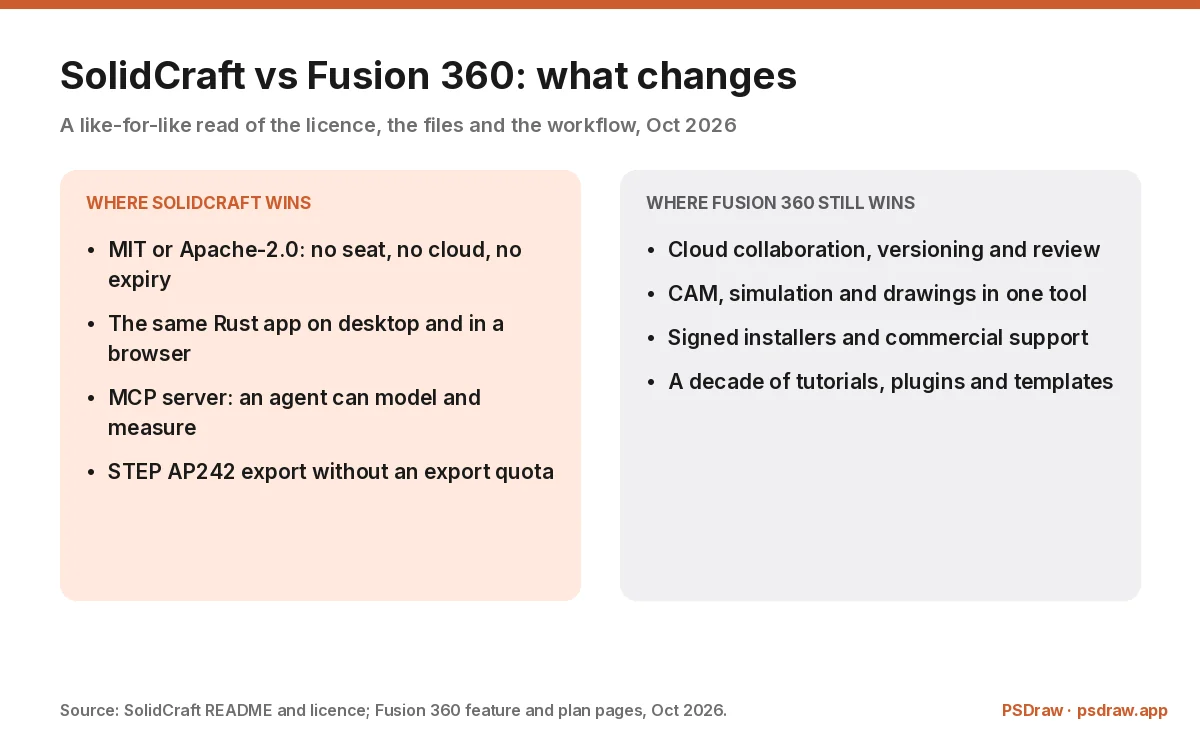
SolidCraft vs Fusion 360 is not a fair fight on breadth, and it is not a fair fight on price either. Fusion 360 brings cloud collaboration, versioning, CAM, simulation, drawings and a decade of tutorials and plugins. SolidCraft brings a free licence, a local file, a browser build and an MCP server, and it stops well before manufacturing toolpaths.
The SolidCraft vs Fusion 360 table under this heading marks only what the two projects document. Where Fusion 360 has a capability SolidCraft does not ship, the row is a miss rather than a “coming soon”. Where SolidCraft is genuinely different — the licence, the local-first file, the agent interface — the row is a win. Read it as a map of which job each tool is for, not as a scoreboard.
The practical split for SolidCraft vs Fusion 360 is simple. If your work ends at a STEP file that someone else machines, SolidCraft covers the modelling and exports cleanly. If your work continues into toolpaths, simulation studies, drawing sets and a colleague reviewing the file in a browser, Fusion 360 is still the shorter path today. A hobbyist, a student or a workshop that owns its files can start with SolidCraft and lose very little. If your work is 2D drafting rather than parametric solids, the CADCraft guide covers the AutoCAD-shaped tool instead. For the full head-to-head on licence, files and CAM, read SolidCraft vs Fusion 360.
SolidCraft MCP: agents that model
SolidCraft ships a SolidCraft MCP server, solidcraft-cli mcp, and the SolidCraft MCP interface is not a gimmick bolted on the side. Every action in the app is a command, so the same command registry that drives the interface drives the agent interface. An agent can create a sketch, set a parameter, measure a body, take a screenshot and export a STEP file inside the running app or headless.
The project’s own demonstration is a rover called SELENE, built entirely through the SolidCraft MCP server: 3,323 editable timeline steps that rebuild with no errors. That is the interesting claim. It is not that an agent can draw a shape, it is that the result is a parametric design a human can still edit, rather than a mesh blob with no history.
If you are evaluating SolidCraft MCP for automation, this is the feature that separates SolidCraft from every other free CAD app. The tool calls are scoped to the open design’s folder when it sits inside your home directory, which is a sensible guard rail rather than a sandbox. Read the MCP documentation before you point an agent at a folder of client files.
Known limits of SolidCraft
The first SolidCraft limit is scope. SolidCraft is a modeller: sketches, features, assemblies and exchange formats. It is not a CAM package, not a simulation suite and not a drawing office. If your deliverable is a dimensioned drawing sheet or a toolpath, you will finish elsewhere, and that is a product decision rather than a bug waiting to be fixed.
The second SolidCraft limit is maturity. The download is unsigned, the release cadence includes nightly builds, and 659 open issues is a lot of surface area. The app is stable enough for the workflow in its own demo, and it is not the tool to bet a production deadline on without a test part of your own. Keep the design file and export early.
The third SolidCraft limit is ecosystem. Fusion 360 has plugins, tutorials and a hiring pool; SolidCraft has a README, a docs site, a Discord and an MCP server. That is enough to learn the tool, and it is not enough to replace a team’s shared workflow this month. The honest summary is a strong second tool that can become a first tool for the right kind of work.
FAQ
Is SolidCraft free?
Yes. SolidCraft is released under MIT or Apache-2.0, so you can use it commercially, modify it and redistribute it as long as you keep the notices. There is no account, no seat and no cloud subscription. The project accepts sponsorship, and that is not required to run the software.
Where is the SolidCraft GitHub repository?
It is github.com/tangency-labs/solidcraft. The project moved there for v0.15.0 and older links redirect. The repository holds the Rust source, the issue tracker, the roadmap, 33 releases and the MIT and Apache-2.0 licence files. Builds from 0.14.0 and older do not follow the move in their in-app update check.
Can SolidCraft open STEP files?
Yes. STEP import covers AP203, AP214 and AP242, including solids, assemblies, units, names and colours, and exports are written as AP242 with body names and components as assemblies. IGES import and export are there too, and mesh formats such as 3MF, STL, OBJ and glTF open as mesh bodies rather than editable features.
Does SolidCraft replace Fusion 360?
Not for everything. SolidCraft covers parametric modelling and clean STEP export, including sketches, features, assemblies and an MCP server. Fusion 360 also brings CAM, simulation, drawing sets, cloud collaboration and commercial support. If your work stops at a STEP file, SolidCraft is enough; if it continues into manufacturing, Fusion 360 still owns that ground.
Does SolidCraft run in a browser?
Yes, at solidcraft.io/app. It is the same Rust application compiled to WebAssembly, not a viewer, so the sketch tools, timeline and STEP export are present. The first load takes a few seconds because the bundle has to arrive, and for repeat work the desktop build is the more practical option.
SolidCraft is the most interesting free CAD release of the month: parametric modelling, native STEP AP242 export and an MCP server, all under MIT or Apache-2.0. Start from the SolidCraft GitHub repository or the browser build, bring one part of your own, and export a STEP file before you commit a project to it. Keep Fusion 360 where CAM, drawings and cloud review are the job.
More ArtCraft guides
- ArtCraft vs AdobeArtCraft rebuilt Photoshop, Illustrator, Lightroom, Premiere and more as free open-source…
- Adobe CloneA developer used AI to clone seven Adobe apps as free open-source software. What the Adob…
- PhotoCraftPhotoCraft is ArtCraft's free, open-source Photoshop alternative. What it can do, how to…
- PhotoCraft ReviewA hands-on PhotoCraft review: what the free ArtCraft Photoshop clone does well, where it…
- PhotoCraft DownloadEvery PhotoCraft download in one place: the Windows MSI, the universal Mac DMG, Linux pac…
- VectorCraftVectorCraft is ArtCraft's open-source Illustrator alternative built in Rust. Supported fi…
- LightCraftLightCraft is ArtCraft's open-source Lightroom alternative on GitHub. Supported RAW forma…
- PdfCraftPdfCraft is ArtCraft's free, open-source Acrobat alternative built in Rust. What it can d…
- WordCraftOpen WordCraft, ArtCraft's free open-source Microsoft Word alternative, right in your bro…
- EffectCraftRun EffectCraft, ArtCraft's free open-source After Effects alternative, in your browser.…
- FilmCraftTry FilmCraft, ArtCraft's free open-source Premiere Pro alternative, in your browser. Wha…
- GridCraftOpen GridCraft, ArtCraft's free open-source Excel alternative, in your browser. Native XL…
- DeckCraftRun DeckCraft, ArtCraft's free open-source PowerPoint alternative, in your browser. Build…
- CADCraftTry CADCraft, ArtCraft's free open-source AutoCAD alternative, in your browser. Command-l…
- SolidCraft vs FusionSolidCraft vs Fusion 360 in 2026: licence, file formats, CAM, simulation and collaboratio…
- DesignCraftOpen DesignCraft, ArtCraft's free open-source InDesign alternative, in your browser. Page…
- SoundCraftTry SoundCraft, ArtCraft's free open-source Pro Tools alternative, in your browser. Recor…
- FigCraftOpen FigCraft, ArtCraft's free open-source Figma alternative, in your browser. Interface…
- ArtCraft MCPEvery Crafting App ships an MCP server in its CLI. Set up one client config for Claude, C…
- GitHub ReposAll ArtCraft repositories on GitHub in one place — PhotoCraft, VectorCraft, LightCraft an…
- DownloadWhere to download ArtCraft safely: getartcraft.com, the ArtCraft Launcher, and GitHub rel…
- LauncherWhat the ArtCraft Launcher does, where to download it, how it installs each Craft app, an…
- AlternativesLooking beyond ArtCraft? Compare the best free and paid alternatives for photo editing, v…
- Is It Open Source?Is ArtCraft really open source and free? What the MIT and Apache-2.0 licenses allow, the…
- Reddit ReviewsWhat Reddit says about ArtCraft and PhotoCraft: the praise, the doubts about AI-written c…
This page is an independent guide by PSDraw and is not affiliated with or endorsed by the ArtCraft Team or Adobe Inc. "ArtCraft" is a trademark of the ArtCraft Team.