PhotoCraft Review: Hands-On With the Free Photoshop Clone
Unofficial guide · Updated Oct 18, 2026 · 10 min read
PhotoCraft is built for desktop. On a phone it may be slow or not open at all.
Open PhotoCraft in your browser
Free, no account, no install. PhotoCraft runs on your device, so your files stay on your computer.
PhotoCraft is built for desktop. On a phone it may be slow or not open at all.
First load downloads about 11 MB. Works best in desktop Chrome or Edge.
PSDraw hosts the unmodified PhotoCraft 0.10.0 web build by the ArtCraft team (MIT or Apache-2.0). Not made or endorsed by the ArtCraft team. License · Source on GitHub
TL;DR
This PhotoCraft review finds a real editor, not a finished one: as of Oct 18, 2026 the free Photoshop clone opens layered PSD files, but its own scorecard still lists missing tools.
- PhotoCraft v0.10.0 shipped on Oct 18, 2026 under MIT or Apache-2.0 and is still labelled early alpha.
- We opened a six-layer PSD in the web build; layers, groups and channels all rendered.
- Plugins, generative fill and deep typography are still named gaps, so paid work stays with Photoshop.
As of Oct 18, 2026
Check: Price
Result: Free, MIT or Apache-2.0
Where it comes from: PhotoCraft license
Check: Latest release
Result: v0.10.0, Oct 18, 2026
Where it comes from: GitHub Releases
Check: Opens layered PSD
Result: Yes, in our test
Where it comes from: PSDraw test, Oct 18, 2026
Check: Plugins
Result: None
Where it comes from: PhotoCraft README
Check: Generative fill
Result: Not included
Where it comes from: PhotoCraft README
The catch: a free PSD editor that opens your file is not the same as an editor you can hand a client file to. PhotoCraft says so itself, and this review repeats it rather than softening it.
https://getartcraft.com/apps/photocraft
Verdict: Try PhotoCraft for layered experiments and PSD inspection; keep Photoshop for plugins, generative fill and type-heavy production, and read the release notes before you trust a version.
This PhotoCraft review is based on the build we could actually run, not on a press release. PhotoCraft is ArtCraft’s free, open-source Photoshop alternative, written in Rust, and version 0.10.0 landed on GitHub on Oct 18, 2026, still stamped early alpha. We opened a six-layer PSD in the official web build hosted on this site, checked what the layers panel reported, and compared that experience with the project’s own scorecard. The result is a PhotoCraft review with a narrow verdict: the file handling is real, the missing pieces are real too, and the release notes matter more than the star count.
PhotoCraft review: the verdict first
PhotoCraft is the most convincing app in the ArtCraft suite and it is still not Photoshop. That sentence is the whole PhotoCraft review. PhotoCraft opens layered PSD and PSB documents, keeps adjustment layers live, and runs as a native Rust app on macOS, Windows, Linux and FreeBSD as well as in a browser. For a free PhotoCraft build shipped in public over a few weeks, that is a lot of working surface.
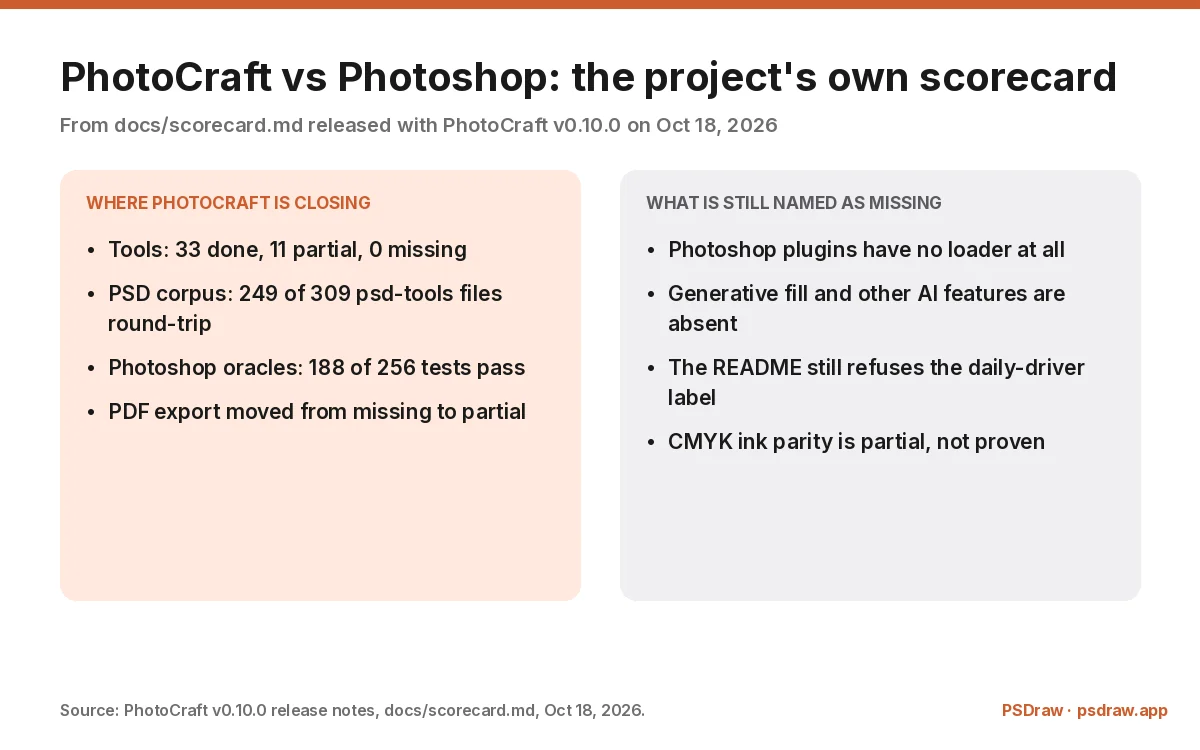
The gap is not a mystery either. The project publishes a scorecard with every release, and the v0.10.0 notes list 33 tools done, 11 partial and none missing, while file compatibility sits at 7 done, 14 partial and 6 missing. PhotoCraft has no plugin loader, no generative fill, and a README that still refuses the phrase “Photoshop replacement for daily professional work.” A PhotoCraft review that skipped those lines would be an advert.
So the honest framing is a tier below replacement. Use PhotoCraft to open a PSD, inspect a stack, test an adjustment, or learn what a layer mask does without a subscription. Do not use PhotoCraft to deliver a print job this week unless you have opened the exported file again and checked it yourself. That is the standard this review applies to every claim below.
What we tested in this PhotoCraft review
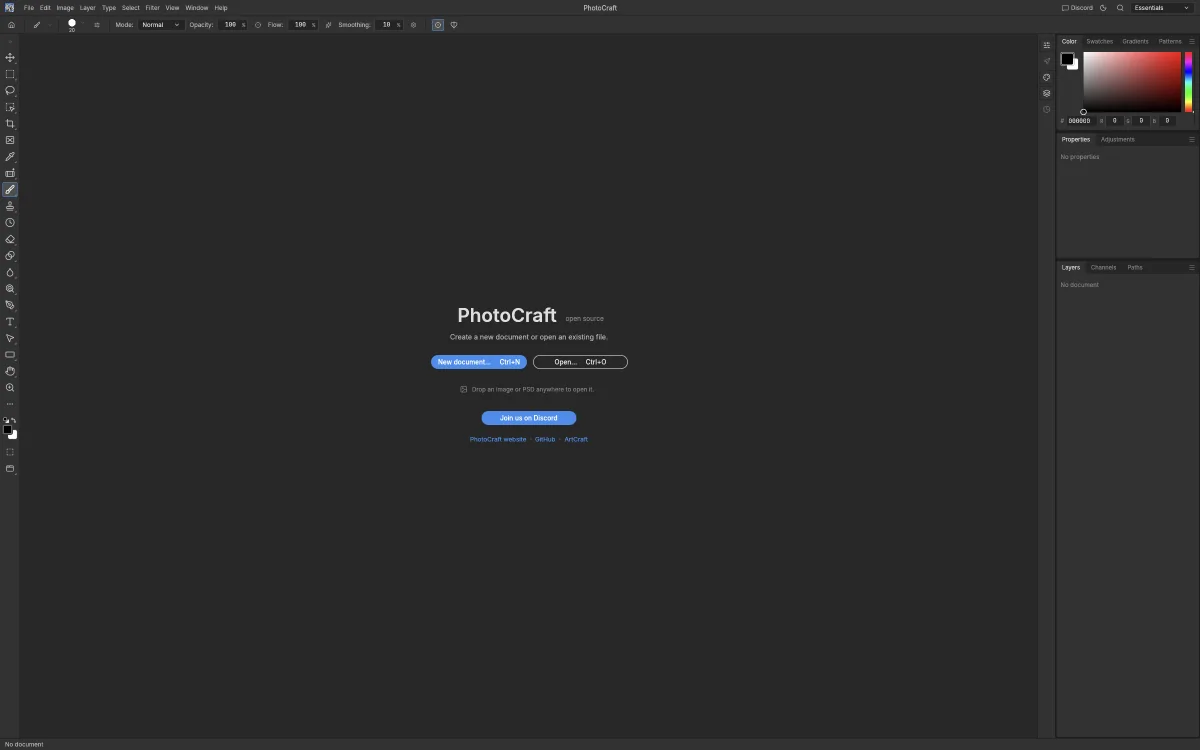
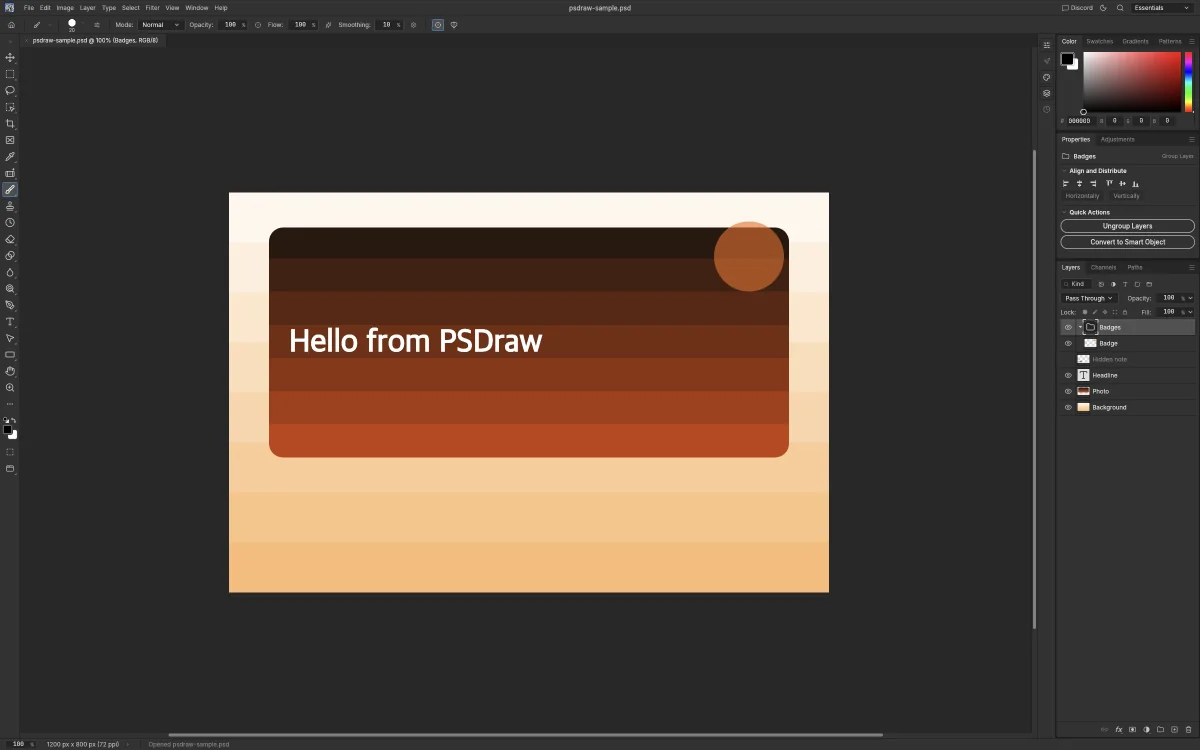
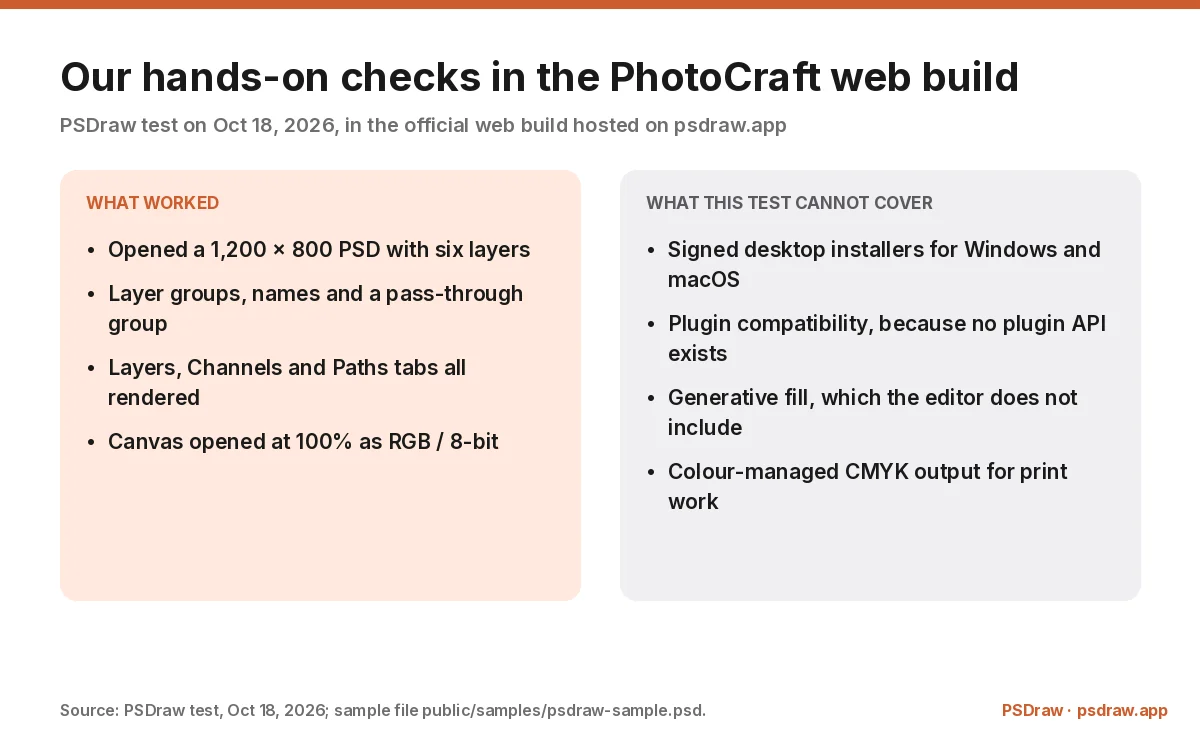
We tested the web build rather than the installers, because the web build is the copy a reader can open in one click. The file was a 1,200 × 800 PSD made for this site, with six layers: a group called Badges holding a badge shape, a punched hole, a headline, a photo layer and a background. Opening it in PhotoCraft produced a canvas at 100%, an RGB / 8-bit document readout, and a layers panel that listed the group and every child layer with its name and thumbnail.
The PhotoCraft panel tabs are the familiar three: Layers, Channels and Paths. The pass-through group was labelled as a group layer, the properties panel offered Ungroup Layers and Convert to Smart Object, and the status bar reported the document size. None of that is proof of Photoshop parity, but it is proof that PhotoCraft is reading a real PSD, not a preview widget pretending to. The feature list behind it is documented in the ArtCraft Photoshop guide.
What the test cannot cover is just as important. We did not run the signed Windows or macOS installers, we cannot test plugins because PhotoCraft has no plugin API, and we cannot test generative fill because the feature is not in the app. A PhotoCraft review built only on a browser session would overstate the PhotoCraft desktop product, so the rest of this review leans on the project’s own documentation for everything the browser tab cannot show.
Tested by the PSDraw team on Oct 18, 2026 in the official PhotoCraft web build hosted on this site, with a 1,200 × 800 PSD of our own.
What PhotoCraft does well
The PhotoCraft editing model is the strong part. Layers, masks, sixteen kinds of adjustment layer, layer styles, type, vector shapes and a brush engine are all described in the README, and the ones we exercised behaved the way a Photoshop user would expect. Adjustment layers stay live, so a Curves or Levels layer can be reordered, masked or switched off without touching the pixels underneath. That is the feature that makes an editor feel professional before anything else does.
File handling is the second strength. PSD and PSB are read and written natively, and the v0.10.0 notes report that 249 of the 309 psd-tools test files survive a re-save with their render intact. TIFF, OpenRaster, PNG and JPEG round out the format list, and the colour pipeline covers RGB, grayscale, CMYK and Lab at 8, 16 and 32 bits with ICC profiles. A free PhotoCraft build that opens a layered PSD and keeps the layers is already useful for inspection alone.
The engineering is unusually visible. PhotoCraft is pure Rust with a wgpu compositor, so the same code runs natively and as WebAssembly, and the release notes read like a test report: 188 of 256 Photoshop oracle tests pass, 30 of 30 crates are free of never-crash lints, and PDF export moved from missing to partial. Whatever PhotoCraft is not, it is not a mock-up, and that is why the PhotoCraft review score here is “promising” rather than “toy”.
Where PhotoCraft still falls short
The PhotoCraft gaps are the ones that decide whether you can switch. PhotoCraft has no plugin loader, so every Photoshop extension, panel and filter you own stops at the door. There is no generative fill or other AI editing inside PhotoCraft, because the AI work lives in a different product. Typography is shallower than a designer doing long-form layout needs, and the README lists fifteen tools that still do not exist. None of those gaps is hidden; all of them are disqualifying for some workflows.
PhotoCraft stability is the quieter problem. An early-alpha label means the next release can change behaviour, and the v0.10.0 notes still track partial work across fourteen file-compatibility areas. Save a copy, reopen it, and check the layers you care about before you delete the original. That advice is boring, and it is exactly the advice a PhotoCraft review should give when the app is three weeks old.
The PhotoCraft interface is also still moving. Menus and shortcuts mostly follow Photoshop, which is the point, but an alpha can rename a panel between releases, and a tutorial written against v0.10.0 may not match v0.10.0. If you follow any PhotoCraft walkthrough, check the version it was written for first. That is a small tax, and it is the tax every fast-moving open-source project charges.
PhotoCraft vs Photoshop: the honest comparison
PhotoCraft vs Photoshop is not a close fight on features, and it is not a close fight on price either, which is why the comparison has to be specific. Photoshop brings plugins, generative fill, years of colour and print refinement, and a file pipeline that clients already trust. PhotoCraft brings layers, masks, live adjustments, native PSD and PSB, CMYK and Lab, and a licence that costs nothing and allows commercial use.
The PhotoCraft vs Photoshop table under this heading marks only the rows the documentation supports. Where the README says a feature is missing, the row is a miss, not a “coming soon”. Where our own test confirmed behaviour, the row is a check. The result is unflattering in the middle and interesting at the edges: for opening a PSD, inspecting layers and exporting a flat image, PhotoCraft is genuinely enough, and for a production retouch with plugins it is not close.
Read the PhotoCraft price row with the same care. Photoshop Photography costs money every month; PhotoCraft is MIT or Apache-2.0, so the code is free to use and change, with the ArtCraft name and logo excluded from the licence. Free is not the same as finished, but it does change the calculation for a student, a hobbyist or anyone who needs to open a PSD once a month.
Is PhotoCraft legit? License, safety and the AI question
Is PhotoCraft legit? Yes, in the sense that matters: PhotoCraft is a real repository under the storytold organisation, with tagged releases, published checksums and a dual MIT or Apache-2.0 licence. On our Oct 14, 2026 snapshot the repository showed 59,605 stars, and the ArtCraft project has press coverage naming Brandon Thomas as the developer behind the AI-assisted rebuild. Popularity is not a quality guarantee, but it does mean the code is being read by a lot of people.
The AI question is separate. ArtCraft’s apps were written with AI assistance, and PhotoCraft is no exception, but “AI-built” describes how the code was produced, not what the editor does. The wider story is on the Adobe clone page if you want the context this review deliberately leaves out. There is no generative model inside PhotoCraft; PhotoCraft is an offline editor. If you are looking for AI image generation, that is ArtCraft AI, a different product with a different pricing model.
Safety is the usual open-source checklist. Download from GitHub Releases or getartcraft.com, verify SHA256SUMS.txt, and be suspicious of any site offering a renamed installer. Every PhotoCraft release ships those checksums, and the macOS build is signed and notarised. A copy that arrives without a checksum, or a page that asks you to disable Gatekeeper, is not a copy this review would run.
PhotoCraft review on Reddit: what early users say
PhotoCraft reviews on Reddit split along the same line as this page. Type photocraft review reddit into Google and you will land on the same handful of threads, most of them arguing about the same two things. The enthusiastic threads focus on what exists: layered PSD support in a free app, a native interface that feels faster than a browser editor, and the fact that the code is auditable. The sceptical threads focus on what does not: missing plugins, an alpha that crashes on unusual files, and the suspicion that a project this young cannot be trusted with client work.
Both camps are describing the same build. A PhotoCraft review that reads only the praise would miss the crash reports, and one that reads only the complaints would miss the people opening PSD files that Photopea and GIMP handle less gracefully. The useful signal is in the specifics: which file, which version, which operating system. A comment that names a version and a symptom is worth ten that say “buggy”.
Our own verdict lines up with the middle of that range. For a free alpha, PhotoCraft is unusually capable, and for production work it is unusually unfinished. If you want the longer Reddit round-up, including the legal debate and the “is it legit” threads, the ArtCraft Reddit guide collects it in one place. This page stays on the editor itself, which is also why the artcraft photocraft review search keeps landing on the same three questions.
How to try PhotoCraft online in your browser
You can use PhotoCraft online without installing anything. The button at the top of this page opens the official web build hosted on this site, unmodified and unrebranded, in a new tab. The first load is about 11 MB, so a desktop browser on a normal connection is the right place to start; a phone will struggle with the canvas and the panels.
Once PhotoCraft opens, press Ctrl+O or use File and Open to load a PSD from your computer. The file stays in the tab, and the editor reads it locally, so nothing is uploaded to us. Drag and drop works too. If you only need to look at a PSD and export a PNG, the lighter PSD viewer on this site is faster, and it is not PhotoCraft.
Treat the PhotoCraft browser session as a test drive. Saving downloads a copy of the file, because a web page cannot overwrite your original, and the desktop build is the one with signed installers and a checksum file. For a one-off look at a layered file, the web build is the fastest way to see whether PhotoCraft’s approach suits you. For repeat work, install it and let the ArtCraft Launcher handle updates.
Who should use PhotoCraft, and who should wait
Use PhotoCraft if you need to open a PSD without a subscription, if you want to inspect someone else’s layer stack, or if you are learning how adjustment layers and masks behave. Use it if you are comfortable checking an export before you send it, and if a missing plugin is not part of your workflow. Students, hobbyists and anyone maintaining an archive of PSD files get real value today.
Wait if your work depends on plugins, generative fill, deep typography or a colour-managed print pipeline. Wait if you need a vendor to support you when a file breaks, because an early-alpha project has no support desk. And wait if you cannot afford the time to re-open a saved file and check it, because the scorecard itself says parts of the file pipeline are still partial.
The middle case for PhotoCraft is the interesting one. If you have a subscription already, keep it and add PhotoCraft as a second tool for quick looks and experiments. Keep the PhotoCraft download guide open when you install it, because the package list changes with every release. If you do not, PhotoCraft plus a lighter PSD viewer covers more than a free tool had any right to a month ago. That is the fairest summary this PhotoCraft review can give: a serious alpha worth installing beside Photoshop, not instead of it.
FAQ
Is PhotoCraft really free?
Yes. PhotoCraft is released under MIT or Apache-2.0, so you can use it, change it and ship it commercially as long as you keep the notices. The ArtCraft name and logo are not covered, so a fork has to drop them. There is no subscription tier inside the editor; the paid product in the family is ArtCraft AI, which is a separate app.
Does PhotoCraft open Photoshop PSD files?
Yes, and it saves them too. PSD and PSB are native formats, read and written without a converter. In our Oct 18, 2026 test the web build opened a six-layer PSD with a group, a headline, a photo layer and a background, and the layers panel reported each one. The v0.10.0 notes say 249 of 309 psd-tools test files keep their render after a re-save, so unusual files can still lose something.
Is PhotoCraft a real Photoshop replacement in 2026?
No, and PhotoCraft says so first. PhotoCraft has no plugin loader, no generative fill and no deep typography, and the README still declines the daily-professional label. For opening PSD files, testing adjustments and exporting a flat image it is genuinely useful. For a client retouch that relies on plugins or AI fill, Photoshop remains the safer tool.
Can I use PhotoCraft online without installing anything?
Yes. The official PhotoCraft web build runs in a browser tab and reads the file locally, so nothing is uploaded. The first load is about 11 MB, and saving downloads a copy rather than writing over your original. If you only need to view a PSD and export a PNG, the PSD viewer on this site is lighter and faster than the full editor.
Is PhotoCraft safe to install?
Take PhotoCraft from GitHub Releases or getartcraft.com, then check the SHA256SUMS.txt that every release ships. The macOS build is signed and notarised, and the Windows builds are signed MSIs or portable zips. Any page that offers a renamed installer, hides the repository, or tells you to switch off Gatekeeper is not a source this review would use.
PhotoCraft earns a cautious yes: a free Photoshop clone that opens layered PSD files today, still short of the plugins, generative fill and type depth paid work expects. This PhotoCraft review would install it beside Photoshop, not in place of it, and would check every export before sending it. If that trade-off fits your week, the editor is worth the download; if it does not, the alpha is not yet the thing to bet a deadline on.
More ArtCraft guides
- ArtCraft vs AdobeArtCraft rebuilt Photoshop, Illustrator, Lightroom, Premiere and more as free open-source…
- Adobe CloneA developer used AI to clone seven Adobe apps as free open-source software. What the Adob…
- PhotoCraftPhotoCraft is ArtCraft's free, open-source Photoshop alternative. What it can do, how to…
- PhotoCraft DownloadEvery PhotoCraft download in one place: the Windows MSI, the universal Mac DMG, Linux pac…
- VectorCraftVectorCraft is ArtCraft's open-source Illustrator alternative built in Rust. Supported fi…
- LightCraftLightCraft is ArtCraft's open-source Lightroom alternative on GitHub. Supported RAW forma…
- PdfCraftPdfCraft is ArtCraft's free, open-source Acrobat alternative built in Rust. What it can d…
- WordCraftOpen WordCraft, ArtCraft's free open-source Microsoft Word alternative, right in your bro…
- EffectCraftRun EffectCraft, ArtCraft's free open-source After Effects alternative, in your browser.…
- FilmCraftTry FilmCraft, ArtCraft's free open-source Premiere Pro alternative, in your browser. Wha…
- GridCraftOpen GridCraft, ArtCraft's free open-source Excel alternative, in your browser. Native XL…
- DeckCraftRun DeckCraft, ArtCraft's free open-source PowerPoint alternative, in your browser. Build…
- CADCraftTry CADCraft, ArtCraft's free open-source AutoCAD alternative, in your browser. Command-l…
- SolidCraftSolidCraft is a free, open-source parametric CAD app in Rust. Where the GitHub repo is, h…
- SolidCraft vs FusionSolidCraft vs Fusion 360 in 2026: licence, file formats, CAM, simulation and collaboratio…
- DesignCraftOpen DesignCraft, ArtCraft's free open-source InDesign alternative, in your browser. Page…
- SoundCraftTry SoundCraft, ArtCraft's free open-source Pro Tools alternative, in your browser. Recor…
- FigCraftOpen FigCraft, ArtCraft's free open-source Figma alternative, in your browser. Interface…
- ArtCraft MCPEvery Crafting App ships an MCP server in its CLI. Set up one client config for Claude, C…
- GitHub ReposAll ArtCraft repositories on GitHub in one place — PhotoCraft, VectorCraft, LightCraft an…
- DownloadWhere to download ArtCraft safely: getartcraft.com, the ArtCraft Launcher, and GitHub rel…
- LauncherWhat the ArtCraft Launcher does, where to download it, how it installs each Craft app, an…
- AlternativesLooking beyond ArtCraft? Compare the best free and paid alternatives for photo editing, v…
- Is It Open Source?Is ArtCraft really open source and free? What the MIT and Apache-2.0 licenses allow, the…
- Reddit ReviewsWhat Reddit says about ArtCraft and PhotoCraft: the praise, the doubts about AI-written c…
This page is an independent guide by PSDraw and is not affiliated with or endorsed by the ArtCraft Team or Adobe Inc. "ArtCraft" is a trademark of the ArtCraft Team.