ArtCraft Launcher: One Installer for All 13 Craft Apps
Unofficial guide · Updated Oct 18, 2026 · 9 min read
ArtCraft Launcher is built for desktop. On a phone it may be slow or not open at all.
Open ArtCraft Launcher in your browser
Free, no account, no install. ArtCraft Launcher runs on your device, so your files stay on your computer.
ArtCraft Launcher is built for desktop. On a phone it may be slow or not open at all.
First load downloads about 4 MB. Works best in desktop Chrome or Edge.
PSDraw hosts the unmodified ArtCraft Launcher 0.5.1 web build by the ArtCraft team (MIT or Apache-2.0). Not made or endorsed by the ArtCraft team. License · Source on GitHub
TL;DR
The ArtCraft Launcher is a free, open-source installer and updater for all 13 Craft apps: it picks the right package for your system, checks the SHA-256 file, and keeps every app current.
- Version 0.5.1 shipped on Oct 18, 2026 under MIT or Apache-2.0, still early alpha and written in pure Rust.
- It covers PhotoCraft, WordCraft, GridCraft, DeckCraft, CADCraft, SoundCraft, FigCraft, LightCraft, FilmCraft, VectorCraft, PdfCraft, EffectCraft and DesignCraft.
- The web build runs the same catalogue in a browser tab, so you can see every version before you install anything.
As of Oct 18, 2026
Question: Price
Short answer: Free, MIT or Apache-2.0
Source: Launcher README
Question: Latest release
Short answer: v0.5.1, Oct 18, 2026
Source: GitHub Releases
Question: Apps covered
Short answer: 13 Craft apps
Source: Launcher README
Question: Runs in a browser
Short answer: Yes, hosted here
Source: Our test, Oct 18, 2026
Question: Installs without prompts
Short answer: No, it uses your system installer
Source: Launcher README
The catch: the launcher is a convenience layer, not a private app store. It downloads the project’s own packages, so a release that is broken is still the release you get, and the alpha badge applies to the launcher as much as to the apps.
Verdict: Install the ArtCraft Launcher if you want one place to add and update the Craft apps; skip it if you prefer to check each release by hand, because the launcher automates exactly that decision for you.
The ArtCraft Launcher is the piece of the ArtCraft suite that is easy to miss: a small Rust application that installs, updates and opens the other thirteen Craft apps from one window. Version 0.5.1 landed on GitHub on Oct 18, 2026, and the same day brought new builds of PhotoCraft, WordCraft, GridCraft, DeckCraft, CADCraft, SoundCraft and the rest, which is exactly the situation the launcher exists for. This page covers what the launcher does, where to download it, how it installs an app, where those files end up, and how to try the web version in your browser without installing anything. PSDraw is not the publisher of the launcher; this is an independent guide.
What the ArtCraft Launcher does
The ArtCraft Launcher does three jobs and does them in one window. It lists every app in the Craft App Suite, shows which ones you already have and at what version, installs the build that matches your operating system and processor, and tells you when an update is out. The README describes it as one place to install, update and open every app in the suite, rebuilt in pure Rust, and that summary is accurate.
The design choice that matters is what it is not. The launcher is native egui, not Electron and not a web view, so it is a small desktop app that can live in the menu bar or the system tray. When you install an app through it, you get the project’s official package: the signed DMG on macOS, the MSI on Windows, the deb or rpm on Linux. The launcher is a front end for those releases, not a repackager with its own build pipeline, and it reads the same catalogue the ArtCraft GitHub repositories publish.
That matters for trust. A third-party installer that bundles its own binaries asks you to trust the bundler. The ArtCraft Launcher asks you to trust the hashes published in each GitHub release, and it checks the SHA-256 of the file it downloaded before it runs anything. The launcher can also find apps you installed by hand, so you do not have to reinstall to bring an existing setup under one roof.
Tested by the PSDraw team on Oct 18, 2026 with the official ArtCraft Launcher web build hosted on this site.
ArtCraft Launcher download: Windows, macOS, Linux and the web
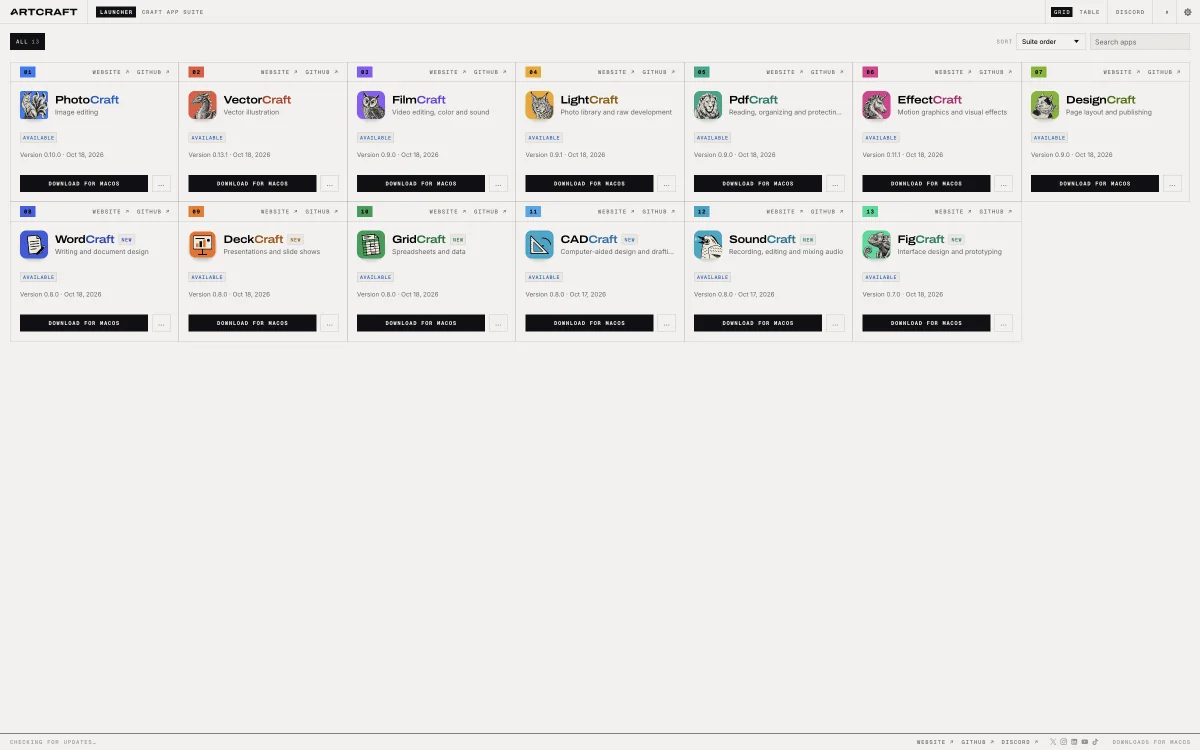
Take the ArtCraft Launcher download from the project’s GitHub Releases page or from getartcraft.com. Version 0.5.1 publishes a macOS universal DMG at about 19.5 MB, Windows MSI and portable zip builds for x64, arm64 and x86 at roughly 9 MB each, and Linux packages as AppImage, deb, rpm, Flatpak and tar.gz for x64, arm64 and riscv64. There is a FreeBSD tar.gz as well. Every release ships SHA256SUMS.txt, so you can check the file before you open it.
The web build is a separate zip of about 4.3 MB, and this site hosts it so you can look at the catalogue without installing anything. That is the version we tested on Oct 18, 2026. Click the button at the top of this page and it opens in a new tab, unmodified and unbranded by us.
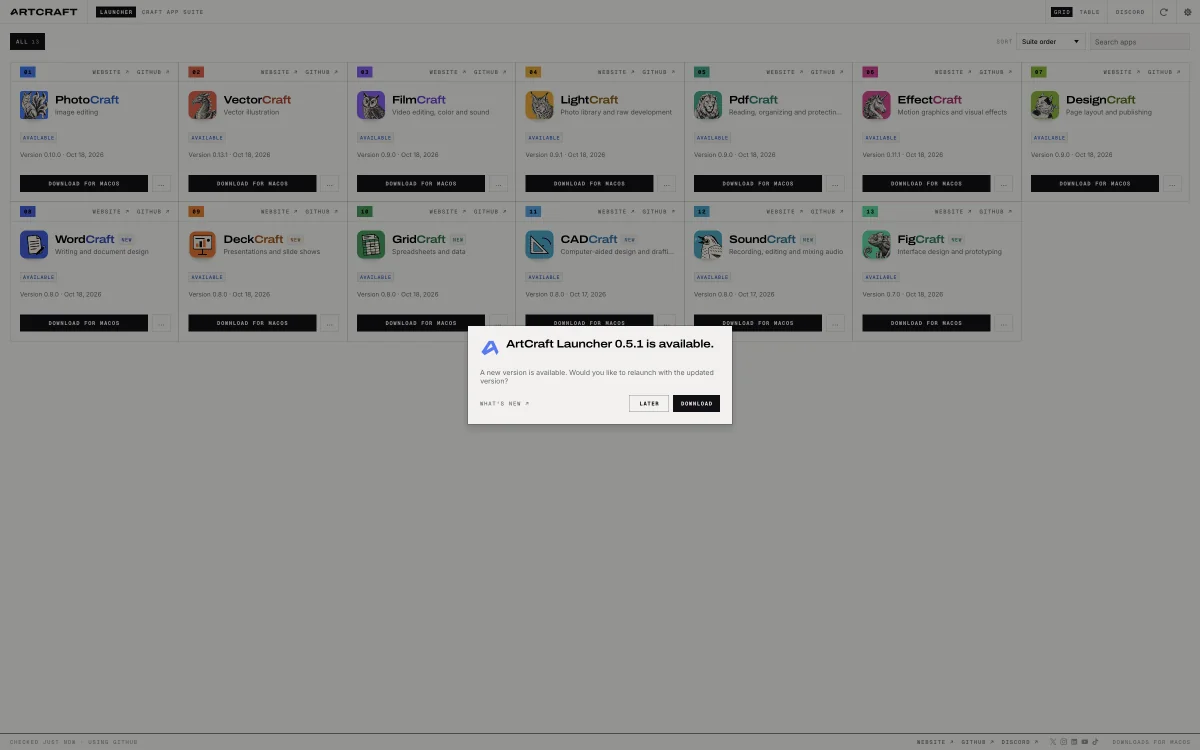
Once installed, the launcher keeps itself current. Our test build opened with a prompt saying a newer ArtCraft Launcher was available, with Later and Download buttons, which is the self-update path working as designed. If you prefer to control versions, download each release by hand using the ArtCraft download guide; the launcher will not force an update you have not accepted.
How the launcher installs an app
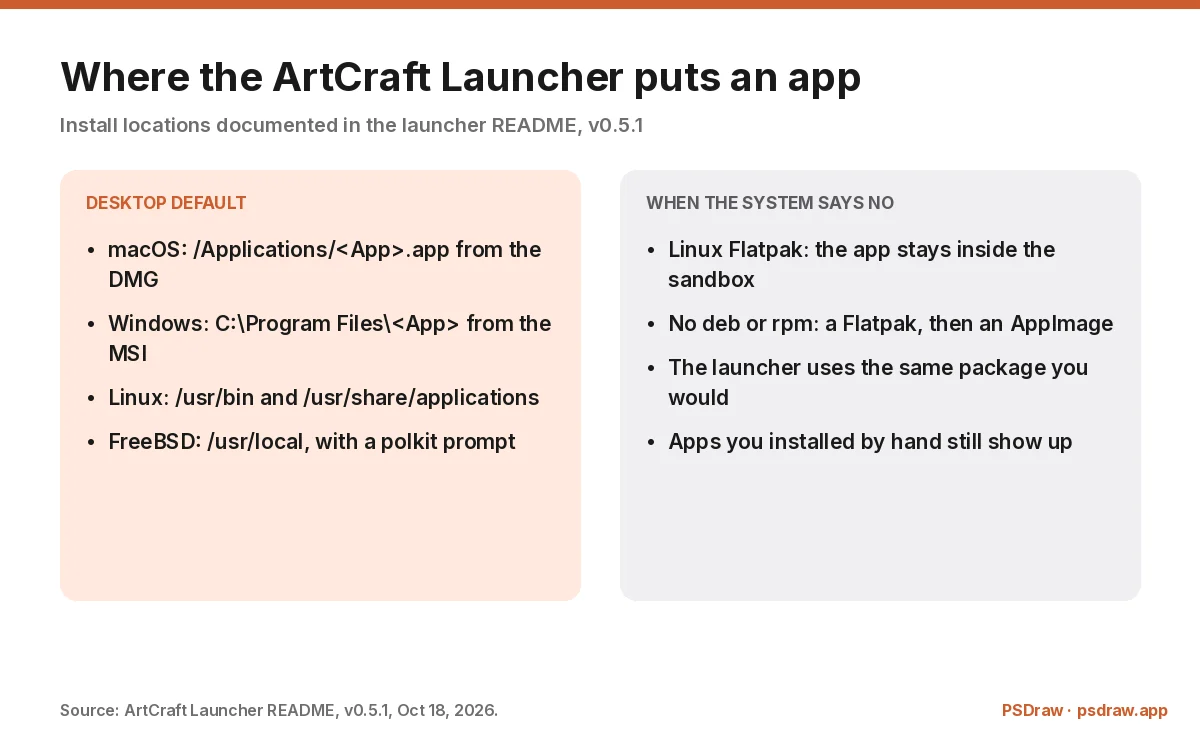
The install flow is the same for every app. Pick an app card, choose Install, and the launcher selects the right asset for your OS and CPU, downloads it, verifies it against the release checksums, and hands it to the system installer. On macOS that means copying a signed and notarised app bundle into Applications. On Windows it means running the MSI through Windows Installer, which also creates the Start menu and Apps and features entries.
Linux is where the details get interesting. With a deb or rpm package, the launcher uses apt, dnf or zypper and your system password prompt, and the app lands in /usr/bin with a desktop entry in /usr/share/applications. Without those package managers it falls back to a Flatpak, or an AppImage in ~/Applications. Inside the launcher’s own Flatpak sandbox, an app can live entirely in the launcher’s data folder with its settings in a home directory beside it, so nothing is installed on the host.
FreeBSD follows the same pattern with /usr/local and a polkit prompt, falling back to ~/.local when polkit is missing. The launcher also uninstalls and updates through the same mechanism, and it remembers what it installed so the version column stays accurate. None of this is exotic; the point is that the launcher does not invent an install location of its own. A launcher that guessed would be worse than no launcher at all.
ArtCraft Launcher vs downloading each app by hand
Doing it by hand is not wrong. Each Craft app publishes its own release page with the same assets the launcher uses, and if you want to read every changelog before you upgrade, the manual path gives you that control. The launcher trades some of that control for a version table that is always current, one update button per app, and no hunting through thirteen repositories.
The trade is worth it when you run several apps. PhotoCraft, WordCraft, GridCraft and the rest ship on the same days, often several releases a week during this alpha period, and checking thirteen release pages is a chore nobody does consistently. The launcher turns that into one screen with an update badge, which is the difference between staying current and staying on a version from two weeks ago.
Doing it by hand is better when you need to pin a build. A studio that has validated a specific PhotoCraft release for a pipeline may not want an automatic bump, and the launcher’s update prompt is easy to decline. The honest summary is that the launcher is a convenience for people who want the latest and a mild nuisance for people who want the same version forever. Neither preference is unreasonable.
The web version: ArtCraft Launcher in your browser
The ArtCraft Launcher web build is the same catalogue with the latest download for each app, and it is the version we point people at first. It does not install anything, because a browser tab cannot run an MSI, but it does answer the question people actually have: which version is current, and where is the download? For a quick check before you install the desktop launcher, that is enough.
Our test of the hosted build showed all thirteen apps with their current versions and release dates, a grid and a table view, a search box, a sort control by suite order, and a What’s new panel. The header carries links to each app’s website and GitHub repository, plus the launcher’s own Discord and download page. The footer reports when the catalogue was last checked, which is the detail that tells you whether the numbers are live.
The ArtCraft Launcher web build also surfaces the launcher’s own update. Our copy of the build opened with a banner saying a newer ArtCraft Launcher was available, which is the same self-update check the desktop app runs. If you are evaluating the launcher rather than the apps, start here: the launcher web build costs nothing, installs nothing, and shows you the whole catalogue in one screen. People also type art craft launcher with a space, and they still end up at the same catalogue.
Updating the Craft apps from the launcher
Updates are the reason to keep the ArtCraft Launcher installed, and the launcher is the only component in the suite that checks every app for you. It checks each app’s GitHub releases, compares the installed version with the latest tag, and shows an update button when they differ. A notification tells you when something new has landed, and the update itself uses the same download and checksum path as a fresh install, so an update is never a different kind of operation from an install.
During the alpha period the cadence is fast. On Oct 18, 2026 alone, PhotoCraft moved to 0.10.0, WordCraft to 0.8.0, GridCraft to 0.8.0, DeckCraft to 0.8.0, CADCraft to 0.8.0, SoundCraft to 0.8.0 and FigCraft to 0.7.0, with smaller bumps across the rest. That is not a schedule you can follow by hand without missing releases, and it is exactly the workload the launcher was built for.
Two practical notes. First, updates replace the app in its normal install location, so anything you customised inside the bundle can be lost; keep presets outside it. Second, a failed update should leave the previous version in place, but check the app opens before you delete an older portable copy you were keeping as a fallback. That is ordinary caution, and an early-alpha suite deserves it.
Language support and settings
The ArtCraft Launcher ships in more languages than most desktop utilities, and the launcher settings apply to the whole catalogue: English, Brazilian Portuguese, Czech, French, German, Hungarian, Japanese, Polish, Russian, Simplified Chinese and Spanish. Auto is the default and follows your system or browser language, and Settings then Language switches immediately and remembers the choice between runs. In the web build you can also force a language with a query string, such as ?lang=ru on the address.
The CJK languages use the system’s own fonts, which is why Simplified Chinese renders with PingFang on macOS, Microsoft YaHei on Windows and Noto Sans CJK on Linux. Where the system has no font for a language, the interface stays in English and Settings explains why, rather than showing empty boxes. Product names and release notes are left as published, and any string without a translation falls back to English.
The rest of the settings are unglamorous and useful: theme, sort order, search, and the update behaviour. There is no account, no telemetry dashboard and no licence key to enter. The launcher is a local tool that talks to GitHub, and the README describes it that way. If you are the person who sets up machines for other people, that is the configuration you want to copy.
ArtCraft Launcher GitHub, licence and release history
The ArtCraft Launcher GitHub repository is storytold/craft-launcher, under the same organisation as the apps it installs. On our Oct 14, 2026 snapshot it showed 2,496 stars, a modest number next to PhotoCraft’s 59,605, which fits a utility that people install once and stop thinking about. The licence is MIT or Apache-2.0, and the README labels the project early alpha.
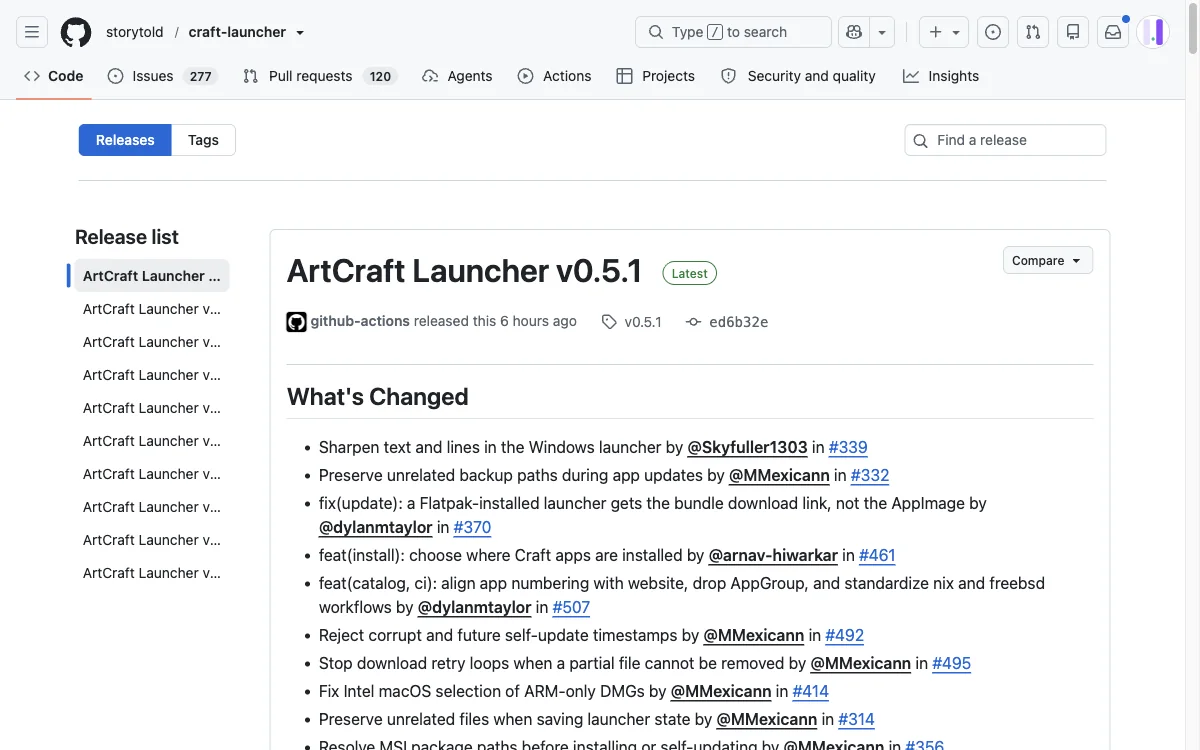
Releases are frequent and small. Version 0.5.1 on Oct 18, 2026 included text sharpening on the Windows launcher, a fix that preserves unrelated backup paths during updates, a corrected Flatpak link for Flatpak-installed copies, a new option to choose where Craft apps are installed, and catalogue numbering aligned with the suite. That list is typical: small fixes, no grand redesigns, shipped often.
If you are auditing the launcher, read the release notes rather than the star count. The notes name the contributors and the pull requests, so you can trace a fix to a change and a change to a person. That is more than most installers offer, and it is the practical meaning of open source for a tool that runs with installer privileges on your machine.
Known limits of the ArtCraft Launcher
The launcher is early alpha, and the README says so. That means the occasional release can break an install path, a language string can be missing, and the interface can change between versions. A utility that touches your system installer deserves more caution than a web page, so keep one portable copy of the apps you depend on and do not update in the middle of a deadline. When a rollback is needed, the PhotoCraft download guide lists the per-platform packages.
The second launcher limit is scope. The launcher installs Craft apps and nothing else, and it depends on GitHub releases being reachable. Behind a corporate proxy or an air-gapped machine, the download step will fail and you will be back to manual packages. There is no offline copy in the launcher itself, and this guide will not pretend otherwise.
The third limit is trust, which no installer can solve for you. Installing through the launcher is the same act as installing the package yourself, with the same privileges and the same consequences. If you would not run an MSI from a repository you have not looked at, do not let a convenient button decide for you. Read the release, check the hash, then install, with the ArtCraft Launcher or without it.
FAQ
Is the ArtCraft Launcher free?
Yes. The launcher is released under MIT or Apache-2.0, so you can use it and inspect the source at no cost. There is no account, no licence key and no paid tier. The apps it installs are free too, and the paid product in the family is ArtCraft AI, a separate web app.
Which apps does the ArtCraft Launcher install?
Thirteen: PhotoCraft, LightCraft, FilmCraft, DesignCraft, VectorCraft, PdfCraft, EffectCraft, WordCraft, DeckCraft, GridCraft, CADCraft, SoundCraft and FigCraft. The catalogue comes from each app’s GitHub releases, so a new app or version appears without the launcher shipping an update first.
Does the ArtCraft Launcher install PhotoCraft for me?
Yes. Pick PhotoCraft, press Install, and the launcher downloads the build for your OS and CPU, checks it against the release SHA-256 checksums, and runs the signed installer. You still see your system’s own install prompts, because the launcher hands the package to the operating system rather than installing silently.
Can I run the ArtCraft Launcher in a browser?
Yes. The project publishes a web build, and this site hosts the official copy, so you can open the catalogue, check versions and copy download links without installing anything. The web version cannot install apps; for that you need the desktop launcher for macOS, Windows, Linux or FreeBSD.
Is the ArtCraft Launcher safe to install?
It is as safe as the releases it points at, which is why the checksum step matters. Download the launcher from its GitHub Releases page or getartcraft.com, then verify it with the SHA256SUMS.txt in the same release. The launcher only installs signed or published packages, but it is early alpha software with installer privileges, so treat updates with normal caution.
The ArtCraft Launcher is the least glamorous part of the suite and one of the most useful: a small Rust app that turns thirteen repositories into one version table and one update button. Install it if you plan to run more than two Craft apps, try the web build first if you only want to see what is current, and keep a portable fallback while the project is still early alpha. That is the trade the ArtCraft Launcher asks for, and at version 0.5.1 it is a reasonable one.
More ArtCraft guides
- ArtCraft vs AdobeArtCraft rebuilt Photoshop, Illustrator, Lightroom, Premiere and more as free open-source…
- Adobe CloneA developer used AI to clone seven Adobe apps as free open-source software. What the Adob…
- PhotoCraftPhotoCraft is ArtCraft's free, open-source Photoshop alternative. What it can do, how to…
- PhotoCraft ReviewA hands-on PhotoCraft review: what the free ArtCraft Photoshop clone does well, where it…
- PhotoCraft DownloadEvery PhotoCraft download in one place: the Windows MSI, the universal Mac DMG, Linux pac…
- VectorCraftVectorCraft is ArtCraft's open-source Illustrator alternative built in Rust. Supported fi…
- LightCraftLightCraft is ArtCraft's open-source Lightroom alternative on GitHub. Supported RAW forma…
- PdfCraftPdfCraft is ArtCraft's free, open-source Acrobat alternative built in Rust. What it can d…
- WordCraftOpen WordCraft, ArtCraft's free open-source Microsoft Word alternative, right in your bro…
- EffectCraftRun EffectCraft, ArtCraft's free open-source After Effects alternative, in your browser.…
- FilmCraftTry FilmCraft, ArtCraft's free open-source Premiere Pro alternative, in your browser. Wha…
- GridCraftOpen GridCraft, ArtCraft's free open-source Excel alternative, in your browser. Native XL…
- DeckCraftRun DeckCraft, ArtCraft's free open-source PowerPoint alternative, in your browser. Build…
- CADCraftTry CADCraft, ArtCraft's free open-source AutoCAD alternative, in your browser. Command-l…
- SolidCraftSolidCraft is a free, open-source parametric CAD app in Rust. Where the GitHub repo is, h…
- SolidCraft vs FusionSolidCraft vs Fusion 360 in 2026: licence, file formats, CAM, simulation and collaboratio…
- DesignCraftOpen DesignCraft, ArtCraft's free open-source InDesign alternative, in your browser. Page…
- SoundCraftTry SoundCraft, ArtCraft's free open-source Pro Tools alternative, in your browser. Recor…
- FigCraftOpen FigCraft, ArtCraft's free open-source Figma alternative, in your browser. Interface…
- ArtCraft MCPEvery Crafting App ships an MCP server in its CLI. Set up one client config for Claude, C…
- GitHub ReposAll ArtCraft repositories on GitHub in one place — PhotoCraft, VectorCraft, LightCraft an…
- DownloadWhere to download ArtCraft safely: getartcraft.com, the ArtCraft Launcher, and GitHub rel…
- AlternativesLooking beyond ArtCraft? Compare the best free and paid alternatives for photo editing, v…
- Is It Open Source?Is ArtCraft really open source and free? What the MIT and Apache-2.0 licenses allow, the…
- Reddit ReviewsWhat Reddit says about ArtCraft and PhotoCraft: the praise, the doubts about AI-written c…
This page is an independent guide by PSDraw and is not affiliated with or endorsed by the ArtCraft Team or Adobe Inc. "ArtCraft" is a trademark of the ArtCraft Team.